
How to Manage Workload in a Small Team: A Practical Guide

Work keeps piling up. The team stays the same size. Two people are drowning, one is waiting for instructions, and nobody is quite sure which task matters most this week.
Sound familiar?
If you want to know how to manage workload in a small team, the answer is not “work faster” or “hire someone”. When a small team starts falling behind, the problem is not always speed. It can also be unclear priorities, limited visibility, or insufficient capacity.
This guide gives you a system you can start using this week. No theory dump. Just a clear way to see the work, rank it, share it fairly, and catch overload early.
Quick answer: A small team can manage a growing workload by measuring its actual capacity, making all active work visible, prioritising tasks, assigning work based on capacity and skills, and reviewing the workload every week.
How to Know When Your Small Team Has Too Much Work
You can’t fix overload you haven’t noticed. So start by diagnosing.
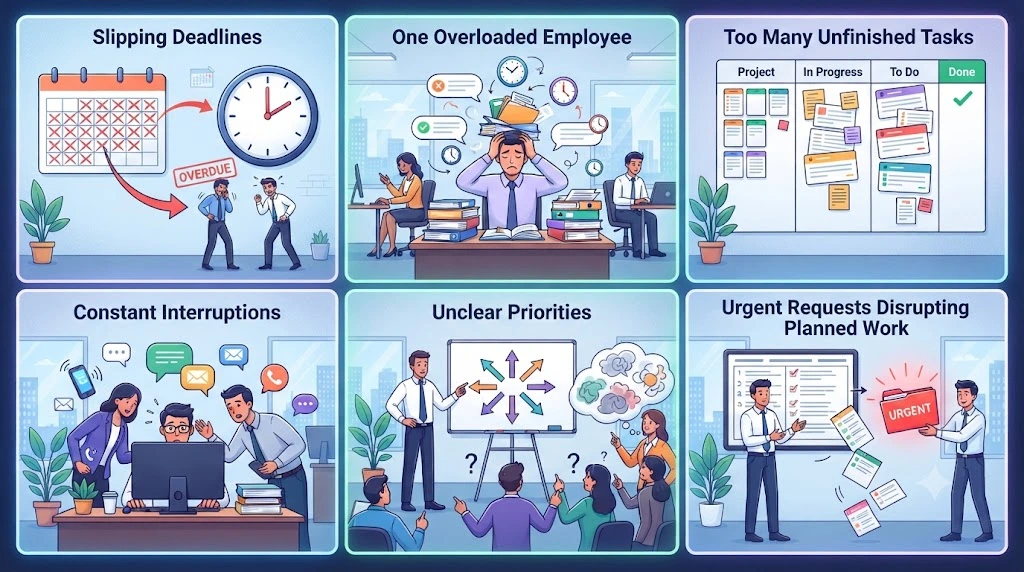
Here are the signs that tend to show up first:
- Deadlines keep slipping. Not once, but as a pattern.
- The same person is always overloaded. Often the most reliable one.
- Lots of tasks started, few finished. Everything sits at “80% done”.
- Important work gets interrupted by smaller requests all day.
- People are unclear on priorities. Ask three members what matters most, and you get three answers.
- Urgent requests keep bumping planned work. The plan exists, but it never survives Monday.
If several of these signs keep appearing together, you’re probably dealing with a workload-management problem rather than a one-off busy week.
Busy Doesn’t Always Mean Overloaded
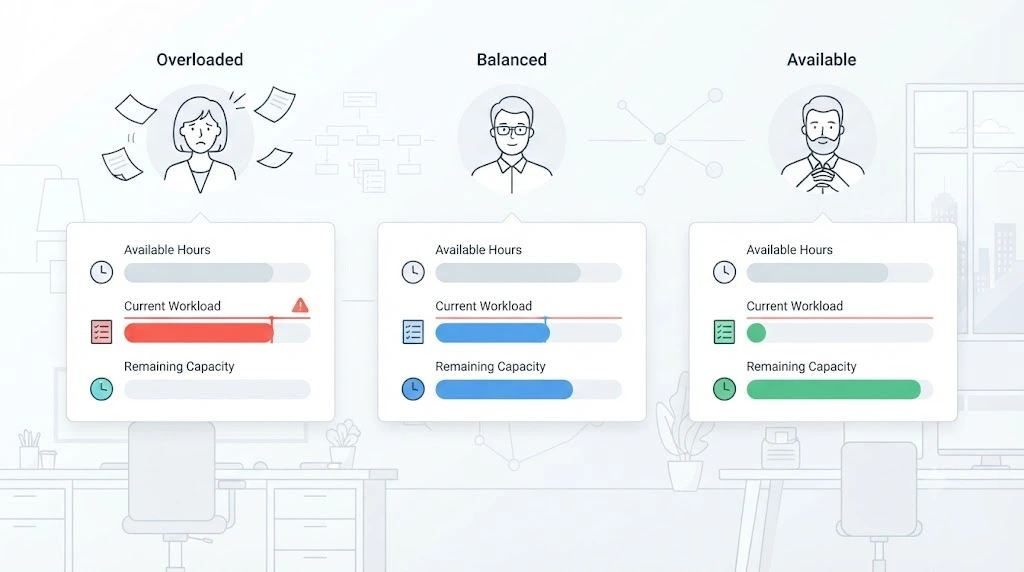
Being busy doesn’t necessarily mean someone is overcapacity. Capacity becomes easier to judge when you compare the work assigned with the time actually available to complete it.
That’s why the next step is to measure.
Measure Your Team’s Real Capacity Before Assigning More Work
This is the core of the whole article. Skip it, and every other tactic becomes guesswork.
Team capacity is the amount of work a team can realistically handle after accounting for the time already committed to meetings, recurring work, administrative tasks, and other responsibilities.
Start With Available Working Time
A 40-hour week does not give you 40 hours of project time. Meetings, emails, admin, check-ins, and time off all take a share.
A simple way to estimate available capacity is:
Available capacity = working hours − meetings − admin − recurring commitments − planned time off
This is a planning estimate, not a precise measure of productivity.
Atlassian’s guide to team capacity planning points the same way: look at the weekly activities, meetings, admin, and recurring work that fill a typical week, not just the hours on a contract.
Here is an example of how this works in practice. Paul Minors, a productivity consultant, shared an interview with a client named Patrick. Patrick worked out each person’s capacity by subtracting admin time and the recurring tasks the team always has to do. That gave him a more realistic idea of how much actual work people could handle. He also adjusts those numbers every few months, because busy seasons change the picture.
The useful lesson is to treat capacity as a working estimate and revisit it when the team’s workload or seasonality changes.
Create a simple capacity table.
You don’t need software to start. A basic table does the job.
(Illustrative example)
| Team member | Available hours | Current workload | Remaining capacity |
|---|---|---|---|
| Person A | 26 | 21 | 5 |
| Person B | 24 | 25 | −1 |
| Person C | 28 | 18 | 10 |
Look at Person B. A negative number means they’re already over capacity before anyone hands them anything new.
Look at Person C. They have room, but that room is only useful if the task fits their skills.
This simple table can make capacity conversations much clearer.
One more thing worth knowing. Asana’s help documentation on team workload and capacity separates workload (a view of the tasks assigned to people) from capacity planning (a wider view of how people are allocated across projects). That distinction matters because task count alone doesn’t always capture how much work someone actually has.
Put All Teamwork in One Visible System
Here’s the next common complaint: “I honestly don’t know what everyone is working on.”
If that’s you, prioritising becomes much harder. You can’t make good priority decisions when important work is scattered across different places.
What to Track for Every Task
Keep it light. For each piece of work, capture:
- Active projects
- Recurring work (reports, client calls, maintenance)
- Deadlines
- Task owner
- Estimated effort
- Dependencies
- Priority
A shared spreadsheet, a Kanban board, or a project tool all work. The tool matters less than one rule: if important work isn’t captured somewhere visible, it won’t be included in your workload picture.
This is also how to track team workload without chasing people for updates. When tasks, owners, and effort live in one place, the picture builds itself.
Don’t Assign New Work Without Checking Current Capacity
Before handing out the next task, look at the table. Ask: who actually has room?
It sounds obvious, yet this pause is a big part of how to manage team workload without creating silent overload. Overload can come from large projects, but it can also build gradually through small requests that never make it into the workload plan.
Prioritise Work When Everything Seems Urgent
When everything is urgent, nothing is. Prioritisation is how you break that loop.
Rank Tasks by Impact and Urgency
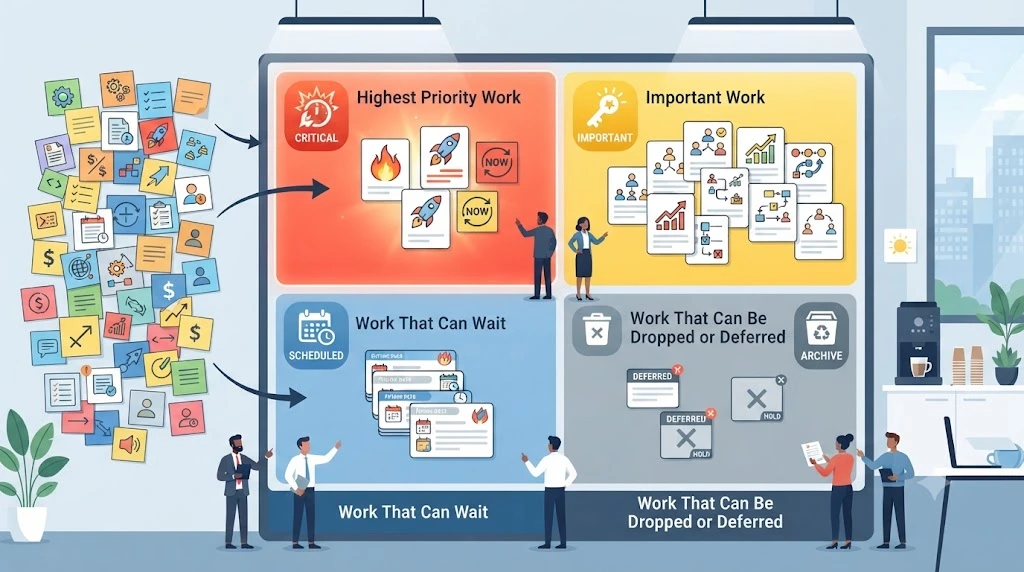
Use a simple four-bucket system:
Must do → Should do → Could wait → Drop or defer
Ask two questions for each task: what happens if this doesn’t get done this week, and who is affected? If the honest answer is “not much”, it belongs in the last two buckets.
Atlassian’s team task prioritisation play helps teams agree on what to prioritise, what can drop off, and which tasks depend on each other. The “what can drop off” decision matters because it makes room for higher-priority work without pretending everything can be completed at once.
Check Dependencies Before Moving Tasks
A task that looks low priority can quietly block a critical one. Before delaying a task, check whether someone else is waiting on it.
Limit Work in Progress
Starting everything feels productive. It often isn’t.
Set a practical limit on how many tasks each person can actively work on at once, and adjust that limit based on the complexity of the work. Keeping fewer tasks in progress can make it easier to maintain focus and finish work before starting more.
Assign Work Based on Capacity, Skills, and Ownership
Now you know what matters and who has room. Time to hand out work.
If you’ve wondered how to assign tasks to employees without upsetting anyone, these four rules help.
Don’t Give Work to the Person Who Answers First
The fastest replier isn’t always the best fit. Over time, this habit turns your most responsive person into your most overloaded one.
Match Tasks to Skills
Capacity alone isn’t enough. A person with five free hours but no experience with the task may take longer than someone with three hours and the right skills. Balance both.
Give Every Task One Clear Owner
Give each task one clearly accountable owner, even when several people contribute.
Check Capacity Before Reassigning Work
Moving a task from one overloaded person to another just moves the problem. Look at the table first.
This is also the heart of how to distribute workload among staff fairly. Fair doesn’t mean equal. It means matched to capacity and skill.
Once your system is clear, you can cut down repetitive follow-ups with automated task assignment and reminders. Treat automation as a helper, not the fix. The system comes first.
How to Balance Workload When One Person Is Overloaded
Many teams end up relying heavily on one person for certain decisions, skills, or urgent tasks. That person is often the first to run out of room.
Move Work Before Burnout Becomes the Problem
Don’t wait until overload becomes a missed deadline, a quality problem, or an explicit request for help.
Reassign Lower-Priority Tasks
Look at the overloaded person’s list. What’s in the “should do” or “could wait” buckets? Move those first.
Shift Deadlines When Necessary
Sometimes the honest answer is that the date has to move. A clear, early message beats a missed deadline.
Don’t Balance Workload by Task Count Alone
Ten quick edits are not the same as ten complex client proposals. If you’re learning how to balance team workload, remember that task count is only one way to estimate workload. Where possible, use estimated hours, effort points, or another measure that reflects the complexity of the work.
What to Do When Capacity and Demand Don’t Match
Sometimes the numbers simply don’t add up. Say one person has 30 hours of capacity this week, but 42 hours of work are planned. That’s a 12-hour gap, and no amount of “trying harder” closes it.
You have four realistic choices:
- Defer lower-priority work to a later week.
- Move a deadline and tell the people affected early.
- Redistribute work to someone with remaining capacity and the right skills.
- Reduce the scope of a task so it takes fewer hours.
The point is to decide on purpose, instead of letting the gap turn into late nights and missed handoffs.
A Real-World Example: How One Marketing Team Gained Workload Visibility
Theory is useful. A real example is better.
Hudl, a sports video and analytics company, shared how its marketing team changed the way it handled work in a case study published by Asana.
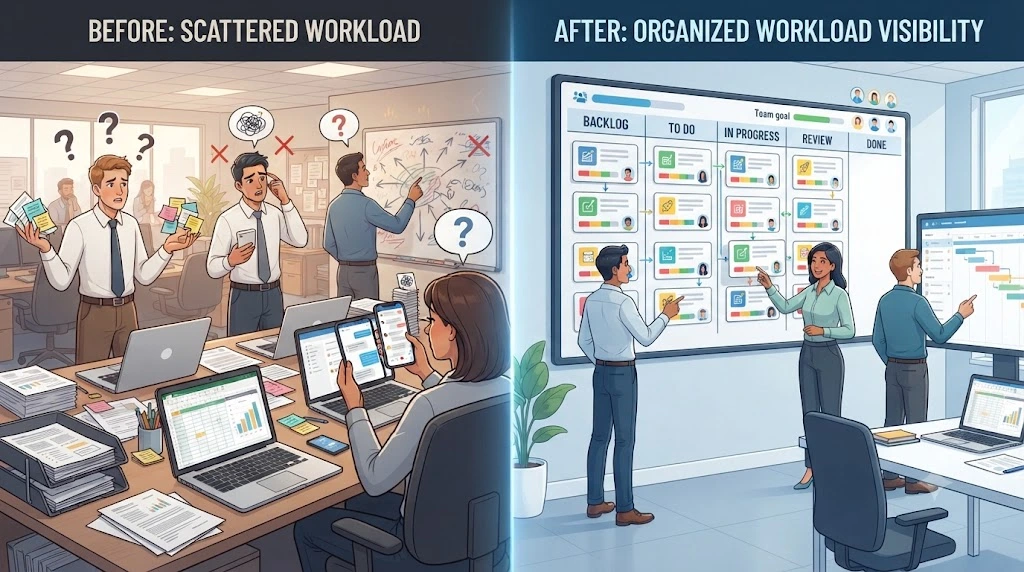
The problem: In its early days, Hudl relied on full-time project managers to triage and staff marketing and web projects like email campaigns, event materials, and landing pages. Work lived across spreadsheets, older tools, and the company intranet. Resource planning took a lot of time, and team members had little visibility into their own workload and priorities.
What changed: The team moved its work into one shared system with workload views and task dependencies. Responding to shifting priorities became as simple as moving a task to a new board or a new owner.
The result: According to the case study, team members who start feeling crunched for time can now check the team’s capacity and reassign work before anyone burns out. The team also reported higher confidence and engagement.
How to read this example: Hudl is a mid-market company with a large marketing and design organization, so this isn’t a small-business case study, and it was published by the tool’s vendor. The underlying principle is still relevant to smaller teams: make work visible, understand capacity, and make reassignment decisions from that shared view.
Source: Asana case study – Hudl
Create a Weekly Workload Review
A system only works if you look at it. That’s what the review is for.
Start with a short weekly workload review. Twenty to 30 minutes is a practical starting point for many small teams. Adjust the frequency if your workload changes faster or slower than that.
Ask:
- What was completed?
- What is still active?
- Who is overloaded?
- Which tasks became urgent?
- Which deadlines changed?
- What can move?
- What should not be started next week?
That last question is easy to skip, and often the most useful one. Deciding what you won’t do is a big part of how to plan team workload realistically.
Atlassian also recommends reviewing your capacity baseline and using it for allocation and prioritization decisions. Think of the weekly review as that baseline check, in small, regular doses.
What to Do When Your Team Is Already Overloaded
If you’re past the warning signs and already underwater, don’t try to fix everything at once. Work through these steps in order:
- Stop adding non-essential work. Pause new requests unless they’re truly critical.
- Identify the bottleneck. Is it one person, one skill, or one approval step?
- Re-rank active work. Use the four buckets again, fresh.
- Move or defer lower-priority tasks. Be selective about what genuinely needs to stay active.
- Rebalance assignments. Check the capacity table before moving anything.
- Communicate deadline changes. Tell clients and stakeholders early.
- Review capacity again. Confirm the numbers now look realistic.
The goal isn’t to clear the entire backlog in one day. It’s to stop adding work faster than the team can absorb it.
Common Workload Management Mistakes Small Teams Make
Avoiding these mistakes makes workload management much easier to maintain:
- Treating every task as urgent. If everything is a fire, nobody trusts the alarm.
- Mistaking available hours for real capacity. Meetings and admin are real work.
- Balancing by task count. Task count is useful, but effort and complexity matter too.
- Making one person the default problem-solver. It may feel efficient in the short term, but it creates a single point of dependency and makes the team harder to rebalance.
- Ignoring dependencies. Low-priority tasks can block high-priority ones.
- Starting too many projects at once. Focus helps work get finished. Spread makes it harder.
- Reviewing workload only during a crisis. Problems are harder to manage once deadlines or handoffs have already been affected.
A Simple Small-Team Workload Management Framework
Want something you can save and use every week? Here is GoFundScale’s simple workload-management framework, the whole article on one line:
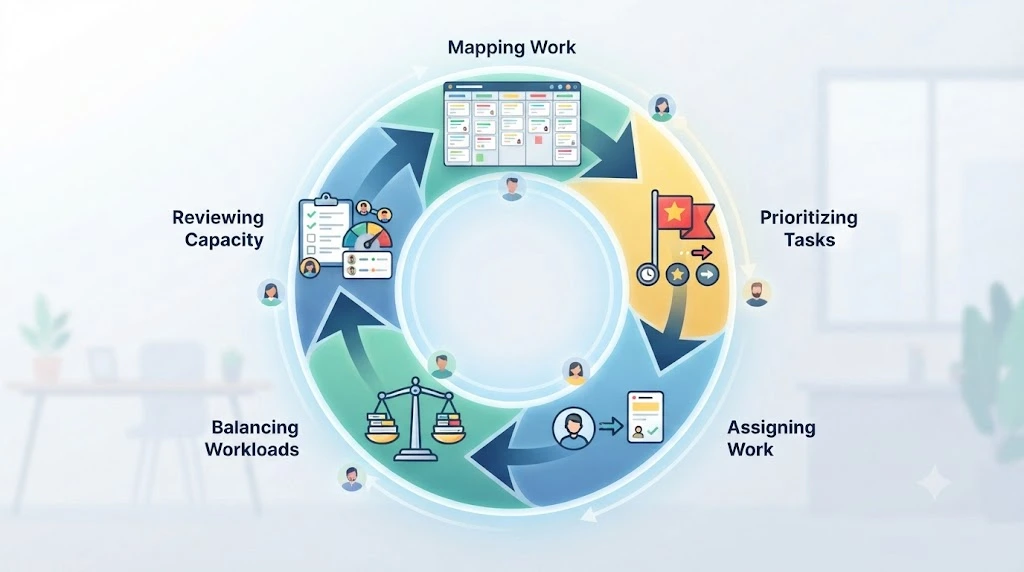
MAP → PRIORITIZE → ASSIGN → BALANCE → REVIEW
- Map: Make all active work visible.
- Prioritize: Look at impact, deadlines, and dependencies.
- Assign: Give each task one owner, based on capacity and skills.
- Balance: Move work away from overloaded people.
- Review: Check capacity again every week.
Then repeat. Workload management is a loop, not a one-time cleanup.
Related Guides
Workload problems often raise bigger questions about growth. If you’re wondering how to grow without stretching your people further, this guide on how to increase small business revenue without hiring more employees covers that separate topic. And if cost is part of your concern, you may also want to read how to scale a small business without increasing operating costs.
Final Thoughts
Learning how to manage workload in a small team comes down to a few honest habits: measure real capacity, keep work visible, rank what matters, assign with care, and review often.
You don’t need expensive software or a heavy process. You need one table, one shared list, and a short review each week.
Ready to Take the Pressure Off Your Team?
Start small today. Start with the team members carrying the heaviest workloads, build a simple capacity table, and run your first short review this week.
Want more practical guides like this? Explore more articles on GoFundScale and subscribe to get new productivity and automation playbooks straight to your inbox.
Frequently Asked Questions
What is workload management for a small team?
Workload management is the practice of matching the amount of work to the people available to do it. For a small team, that means knowing each person’s real capacity, tracking all active tasks, and shifting work before anyone gets overloaded.
How do you manage workload in a small team?
Follow five steps: map all active work, prioritize by impact and urgency, assign tasks based on capacity and skills, balance workloads when someone is overloaded, and review the numbers every week.
How do you know if a team member is overloaded?
Look for practical signs such as slipping deadlines, too much active work, repeated context switching, missed handoffs, or work that consistently exceeds the person’s available capacity.
How do you distribute work fairly among employees?
Fair isn’t equal. Distribute work by available capacity, skill fit, and task complexity. Avoid giving extra work to whoever replies fastest, and check the capacity table before every new assignment.
How do you prioritize tasks when a small team is overwhelmed?
Sort tasks into four groups: must do, should do, could wait, and drop or defer. Check dependencies before delaying anything, and set a practical limit on how many tasks each person has active at once.
How often should a small team review workload?
A weekly review is a practical starting point for many small teams. If priorities or workload change rapidly, add shorter checks when needed.
How do you balance workload without overloading employees?
Weigh tasks by effort, not count. Move lower-priority work off overloaded people first, adjust deadlines honestly, and avoid reassigning work to someone who is already near capacity.