Business Automation Services for Small Businesses: What to Automate, Tools & Costs

Running a small business often means wearing five hats before lunch — and most of those hats come with the same repetitive tasks attached: replying to the same customer questions, chasing invoices, re-entering data from one tool into another, and manually assigning work to your team. This is exactly where business automation services come in. Instead of hiring more people to handle repetitive coordination, automation lets software quietly handle it in the background.
This article walks through what business automation services actually are, which processes are worth automating first, the tools small teams use to do it, realistic costs, and a simple step-by-step framework to get started—even if you’ve never automated anything before.
What Are Business Automation Services?
Business automation services help companies replace manual, repetitive processes with software-driven workflows. Instead of a person copying information from a form into a spreadsheet, then emailing a teammate, then updating a task board, an automated workflow does all three steps the moment a trigger event happens.
At the core, most automation runs on a simple model: trigger → action → result. A trigger is an event, like a new form submission or a paid invoice. The action is what the software does in response—creating a record, sending a message, or updating a status. The result is the outcome your team sees, without anyone touching the process by hand.
It’s worth separating automation from AI. Automation follows fixed, rule-based logic—if this happens, do that. AI adds judgment on top of that logic, like reading an email and deciding how to route it. Many modern business automation services blend both, but a small business doesn’t need AI to get real value; rule-based automation alone removes a huge share of daily busywork.
How Business Automation Works
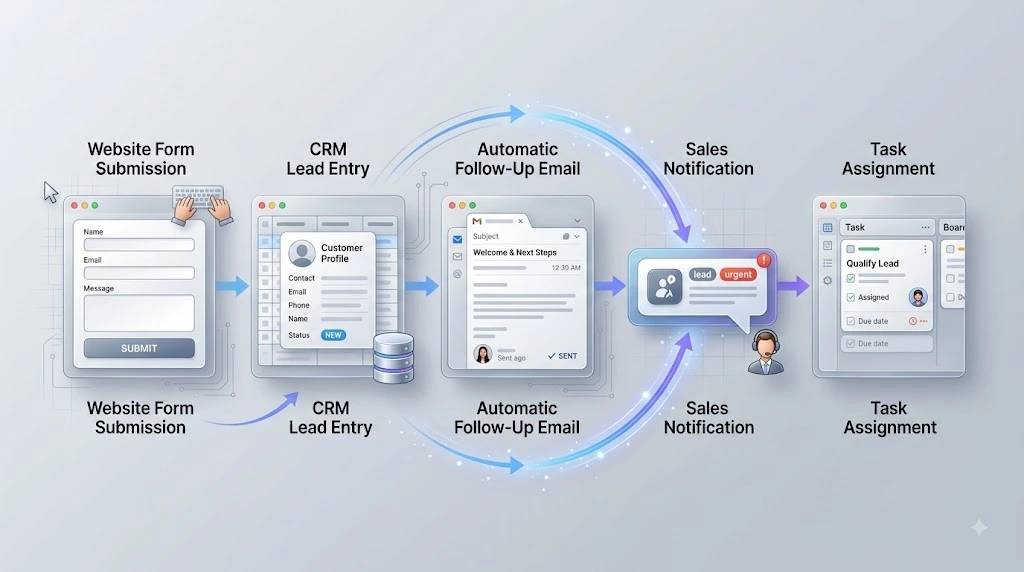
A simple example makes this concrete: a new lead fills out a website form → the lead is automatically added to the CRM → a follow-up email goes out within minutes → the sales rep gets a notification → a follow-up task is created automatically. None of that requires anyone to remember to do it manually.
What Automation Services Can Handle
Business automation services typically take over tasks such as the following:
- Data entry between apps
- Lead management and routing
- Notifications and alerts
- Task assignment
- Customer follow-ups
- Reporting
- Marketing workflows
Why Small Businesses Need Automation Services
Small teams don’t fail at growth because of a lack of effort — they fail because manual processes don’t scale. As order volume, leads, or clients increase, the same repetitive tasks multiply, and there simply aren’t more hours in the day to keep up manually.
This shows up as missed follow-ups, inconsistent customer experiences, and small human errors that compound over time—a forgotten invoice reminder, a lead that never got a second email, and a task that fell through the cracks because no one flagged it. This isn’t just a productivity issue, either: one survey found that 29% of small business owners are prioritizing automation specifically to reduce the risk of burnout, not just to cut costs. <sup>[1]</sup>
Save Time Without Expanding the Team
Automation lets a five-person team operate like a much larger one, because the software absorbs the coordination work that would otherwise require another hire.
Reduce Repetitive Manual Work
Copy-pasting data, sending the same email templates, and manually updating spreadsheets are exactly the tasks automation removes first — freeing your team for work that actually needs a human judgment call.
Create More Consistent Workflows
When a process runs the same way every time, customers get a consistent experience, and nothing depends on one person remembering the right steps.
What Should a Small Business Automate First?
Not every process deserves automation on day one. The best starting points are high-frequency, low-judgment tasks—things your team does often and does the same way each time. For a broader look at where to begin, see 10 Proven Business Automation Strategies to Scale Fast in 2026.
Lead Capture and Follow-Up
This is usually the highest-impact place to start. A typical flow looks like: form submission → CRM entry → automatic follow-up email → sales notification. It closes the gap between a lead showing interest and your team responding, which is often where deals are won or lost. Related reading: Easy Lead Follow-Up Automation for Small Business in 2026
Project Management and Task Assignments
Automating the flow of new task → assignment → deadline → reminder → status update keeps projects moving without anyone manually chasing updates in Slack or email. Related reading: Automate Project Management and Task Assignments: 7 Proven Ways
Customer Communication
Routine emails, appointment reminders, and standard responses to common questions can run automatically, while your team stays available for anything that needs a personal touch.
Invoicing and Payment Reminders
A simple sequence — invoice creation → notification → reminder → payment status update — cuts down on the time small businesses spend chasing late payments manually.
Marketing Workflows
Email sequences, content distribution, and lead nurturing campaigns can run continuously in the background instead of depending on someone remembering to hit “send” each week.
Reporting and Notifications
Automatically tracking and reporting on key business events — a big sale, a churn risk, a low inventory alert — means important information reaches the right person without anyone having to go looking for it.
Business Automation Tools for Small Businesses
Rather than listing every tool on the market, it helps to think in categories, since most small businesses need a mix of two or three types working together. (Note: specific tool names and pricing will be added once verified — see the editor’s note at the end of this article.)
CRM Automation Tools
These handle lead management, automatic follow-ups, and centralized customer records, so no lead sits untouched in an inbox.
Workflow Automation Tools
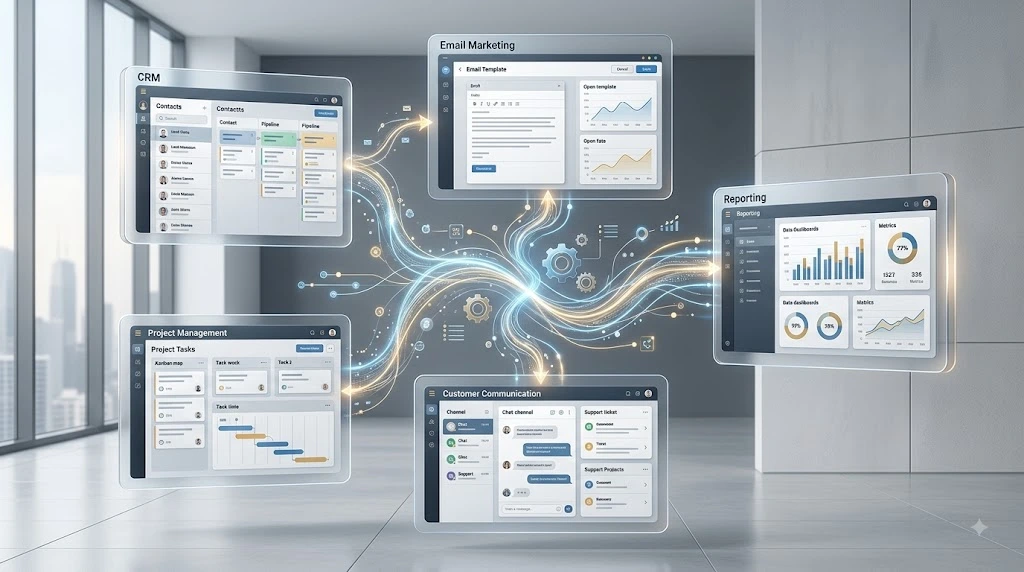
No-code platforms connect different apps so information flows between them automatically — a form tool talking to a CRM, which talks to a project board, which talks to your inbox. Related reading: No-Code Integration Tools: 4 Best Easy Ways to Connect Apps
Project Management Automation Tools
These handle task creation, deadline tracking, assignment rules, and reminders, keeping projects visible without manual status meetings.
Marketing Automation Tools
Built for email campaigns, audience segmentation, and lead nurturing sequences that run on autopilot once set up.
Communication and Messaging Automation
These tools manage routine email replies, internal notifications, and messaging workflows so nothing important gets missed in a busy inbox.
Business Automation Services vs. DIY Automation
Once you know what to automate, the next decision is whether to build it yourself or bring in help.
| DIY Automation | Automation Service |
|---|---|
| Lower initial cost | Higher setup cost |
| Self-managed | Expert-managed |
| Good for simple workflows | Better for complex workflows |
| More learning required | Faster implementation |
When DIY Automation Makes Sense
If your workflow is simple — connecting two apps with a single trigger and action — most no-code tools let you build it yourself in an afternoon, with no technical background required.
When to Hire an Automation Service
Once a workflow spans multiple tools, needs conditional logic, or touches sensitive customer data, a professional automation service can design something more reliable and avoid the trial-and-error that eats up owner time. This is usually where business automation services deliver the most value: turning a messy, multi-step manual process into something that runs correctly the first time.
How Much Do Business Automation Services Cost?
There’s no single universal price, because cost depends heavily on how complex the process is, how many tools need to connect, and how much ongoing support is required. That said, it helps to understand the general cost layers.
Free and Low-Cost Automation
Many workflow tools offer free tiers that cover a handful of simple automations—enough for a solo founder or very small team to start with almost no budget.
SaaS Automation Tools
Paid plans on CRM, marketing, or workflow platforms typically scale with usage—more contacts, more automated tasks, or more integrations raise the monthly cost.
Freelancer or Specialist Setup
Hiring an independent automation specialist for a one-time build is usually more affordable than a full agency and works well for a single, well-defined workflow.
Professional Automation Services
Agencies or automation consultancies typically charge more upfront but bring broader experience, handle multiple interconnected workflows, and reduce the risk of costly mistakes.
Ongoing Maintenance and Optimization
Automations aren’t “set and “forget”—APIs change, business processes evolve, and workflows need periodic review, which is often billed separately or as a retainer.
A simple way to frame total cost:
Cost = Tools + Setup + Integrations + Maintenance
How to Choose the Right Business Automation Service
Identify the Process First
Choose a provider based on the specific workflow you need automated, not the other way around—starting with a tool before defining the process usually leads to a poor fit.
Check Integration Compatibility
Confirm the service or tool actually connects with the software you already use—your CRM, payment processor, and communication tools—before committing.
Calculate Time and Cost Savings
Estimate how many hours per week the manual version of the task currently takes, and weigh that against the setup and subscription cost.
Consider Scalability
Pick a service or tool that can grow with you, so you’re not rebuilding the same workflow again in a year once your volume increases.
Check Support and Maintenance
Ask what happens when something breaks—reliable support and clear maintenance terms matter more once a workflow becomes part of your daily operations.
How to Start Automating a Small Business
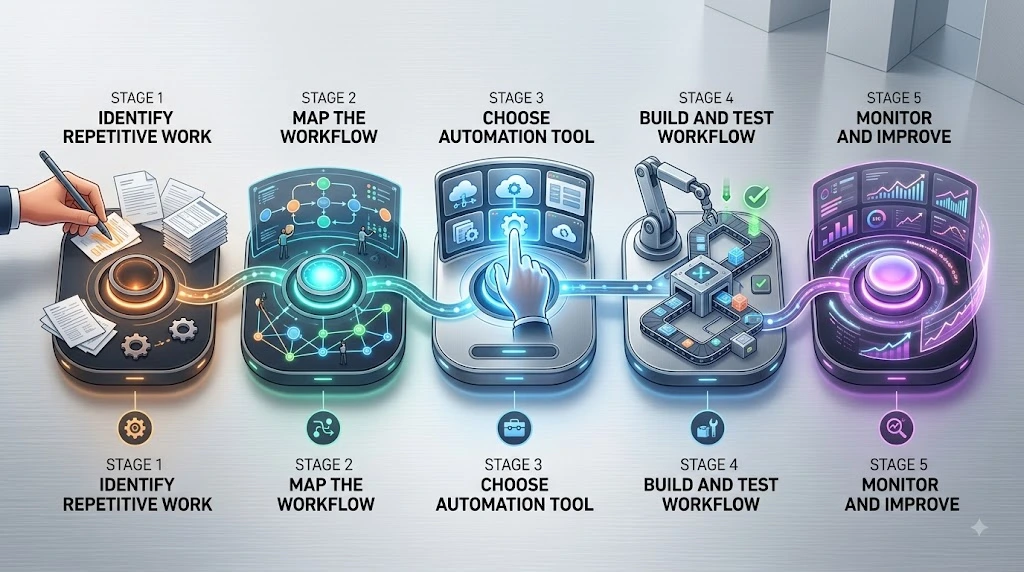
Step 1: Find Repetitive Processes
List the tasks your team repeats every day or week — these are your best automation candidates.
Step 2: Map the Current Workflow
Write down every step of the process exactly as it happens today, including who does what and in what order.
Step 3: Choose the Right Automation Tool
Match the tool to the workflow’s complexity—a simple two-step process rarely needs an enterprise-grade platform.
Step 4: Build and Test the Workflow
Set up the automation in a test environment first, and run it with sample data before switching your real process over.
Step 5: Monitor and Improve
Review performance after launch, fix any gaps, and refine the workflow as your process or tools change.
Common Business Automation Mistakes to Avoid
Even well-intentioned automation projects can go wrong. Watch out for:
- Trying to automate every process at once instead of starting small
- Choosing a tool before fully understanding the workflow
- Adding too many overlapping tools that create more complexity, not less
- Skipping testing before going live
- Removing human oversight entirely from processes that still need judgment calls
- Ignoring ongoing maintenance once the automation is running
- Treating automation as a one-time setup instead of something that needs periodic review
Frequently Asked Questions
What are business automation services?
Business automation services help companies design and implement software-driven workflows that replace manual, repetitive tasks — from lead follow-ups to invoicing — using a trigger-action-result model.
What should a small business automate first?
Lead capture and follow-up are usually the best starting point since they’re high-frequency, easy to define, and have a direct impact on revenue.
How much do business automation services cost?
Costs vary widely based on complexity, ranging from free tool tiers for a single simple workflow to ongoing retainers for multi-step, professionally managed automation.
Are automation services worth it for small businesses?
For processes that are repetitive, high-volume, or error-prone, yes — the time saved and consistency gained typically outweigh setup costs within a few months.
Can small businesses automate without coding?
Yes. Most modern workflow automation platforms are no-code, built specifically so non-technical business owners can connect apps and set up rules without a developer.
Conclusion
Business automation isn’t about replacing people—it’s about turning repetitive coordination work into a system that runs reliably in the background so your team can focus on the work that actually needs human judgment. The businesses that get the most out of automation don’t try to automate everything at once; they start with one clear, repetitive workflow, measure the time it saves, and expand from there.
Start with one repetitive workflow, measure the result, and expand automation as your business grows.
Source cited: [1] Vena Solutions, “70 Business Automation Statistics Driving Growth in 2025” — https://www.venasolutions.com/blog/automation-statistics