
10 Proven Business Automation Strategies to Scale Your Small Business in 2026
Introduction
.”Business automation strategies are essential for small business owners looking to save time and scale operations in 2026. Currently, founders worldwide spend over 40% of their workweek on repetitive manual tasks—like chasing invoices, retyping data, and manually updating spreadsheets—wasting nearly two full workdays every single week.
The good news? You don’t need a bigger team or a bigger budget to fix this. You need better systems.
Business Process Automation (BPA) is no longer a luxury reserved for enterprise companies with dedicated IT departments. In 2026, it’s the single most accessible growth lever available to solopreneurs, startups, and small teams. With no-code tools now costing less than a daily coffee, automation has become the greatest equalizer between small businesses and their larger competitors.
In this guide, you’ll learn exactly what business automation is, the 10 proven strategies smart founders are using right now to reclaim their time and scale faster, a breakdown of affordable tools to get started this week, and the common pitfalls that cause automation projects to backfire. By the end, you’ll have a clear, actionable roadmap — not just theory.
What is Business Process Automation (BPA)?
In plain English: Business Process Automation is the use of software and digital tools to complete repetitive tasks automatically, without a human having to do them manually every time.
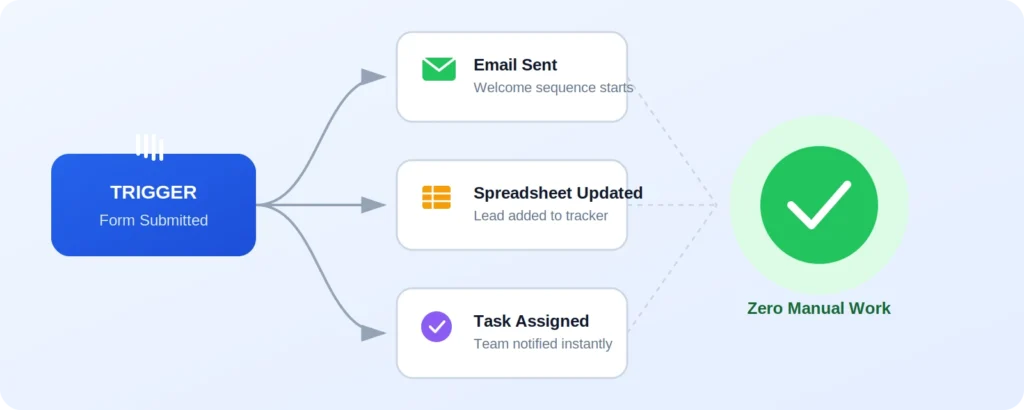
Think of it like setting up dominoes once — a trigger happens (a customer fills out a form, an invoice due date arrives, a new order comes in), and a chain of pre-set actions fires off on its own: an email gets sent, a spreadsheet updates, a task gets assigned, a receipt gets generated.
It’s important to understand the difference between two things people often confuse:
- Automation means using tools or software to handle a task — the work is done by a system, following rules you set up once.
- Outsourcing means delegating that same task to another human being — a freelancer, an agency, or a virtual assistant — who does the work manually on your behalf.
Automation is faster, cheaper at scale, and available 24/7 across every time zone. Outsourcing still has its place for tasks requiring judgment, creativity, or relationship-building — but for anything repetitive and rules-based, automation should be your first move.
10 Key Business Automation Strategies to Scale Operations
“Avoiding these mistakes is crucial when implementing long-term business automation strategies.”
Ready to put this into practice? Below are the 10 highest-impact areas of your business to automate first — each one battle-tested by small businesses and startups scaling across global markets. You don’t need to tackle all ten at once; even implementing two or three of these will free up hours of your week almost immediately.
1. Automate Lead Capture and Email Nurturing
“Lead capture is one of the foundational business automation strategies for sales teams.”
Every visitor who leaves your website without converting is a missed opportunity — unless you’ve automated the follow-up. Smart web forms can instantly capture a lead’s name, email, and interests, then drop them into a pre-built email drip sequence that nurtures them over days or weeks without you lifting a finger.
Tools like ConvertKit and Mailchimp let you build these sequences once, tag subscribers based on behavior (did they open the email? click a link?), and automatically send the right message at the right moment. The result: warmer leads arrive in your inbox ready to buy, instead of cold contacts you have to chase.
2. Put Invoicing and Recurring Payments on Autopilot
Manually creating invoices, chasing late payments, and tracking recurring subscriptions is one of the biggest time-drains for small business owners — especially those billing international clients across different currencies.
Platforms like Stripe and QuickBooks can automatically generate and send invoices on a schedule, charge saved payment methods for recurring subscriptions, send polite automated payment reminders, and reconcile your books in real time. This alone can save several hours a month and dramatically improve your cash flow consistency.
3. Streamline Customer Support with AI & Smart Workflows
“AI-driven support is one of the smartest business automation strategies to scale customer care.”
Customers today expect fast answers, regardless of time zone. You don’t need a 24/7 support team to deliver that — you need smart workflows.
Live chat triggers can greet visitors and answer common questions instantly. Automated FAQ bots can resolve simple queries before a human ever needs to step in. Ticketing systems can automatically route complex issues to the right team member, prioritize urgent requests, and send status updates to customers without manual follow-up. This keeps satisfaction high while your support hours stay low.
4. Automate Social Media Scheduling & Content Distribution
Staying visible on social media shouldn’t mean living on your phone. Scheduling tools let you batch-create a month of content in one sitting, then automatically publish it across platforms at the optimal time for each audience — including audiences in different global time zones.
Tools like Buffer and Metricool also let you recycle evergreen content, auto-crosspost between platforms, and pull performance analytics into one dashboard — so you can see what’s working without checking five different apps.

5. Connect Your Apps with No-Code Integration Tools
“No-code integration forms the backbone of modern business automation strategies
Most small businesses run on a patchwork of disconnected apps — a CRM here, an email tool there, a project tracker somewhere else. Without integration, you end up manually copying information between them, which wastes time and invites errors.
No-code integration platforms like Zapier and Make act as the connective tissue between your tools. Set up a “Zap” once — for example, “when a new order comes in on Shopify, automatically add the customer to my email list and create a task in my project tool” — and it runs silently in the background forever. This is often the single highest-leverage automation a small business can implement.
6. Automate Internal Project Management & Task Assignments
Chasing team members for status updates or manually assigning tasks after every client call eats into leadership time. Project management tools now handle this automatically.
With Notion, Asana, or Trello, you can set rules so that when a task moves to a certain stage, the next team member is automatically notified and assigned, deadlines trigger automatic reminders, and status reports get generated without anyone typing an update. This keeps your team aligned and accountable — without you playing project manager 24/7.
7. Automate Client Onboarding & Contract Signing
“Automating client onboarding improves client satisfaction and strengthens overall business automation strategies.”
First impressions matter, and a clunky onboarding process can undercut an otherwise great sales experience. Automating this journey makes you look polished and professional from day one.
E-signature tools like DocuSign and PandaDoc allow contracts to be sent, signed, and filed automatically. Pair this with an automated “welcome kit” — a sequence that delivers login details, next steps, and helpful resources the moment a contract is signed — and new clients feel taken care of instantly, with zero manual effort from you.
8. Automate Inventory & Order Management
“Inventory tracking remains one of the most critical business automation strategies for e-commerce.”
For product-based businesses, manually tracking stock across multiple sales channels is a recipe for overselling, stockouts, and frustrated customers. Real-time inventory syncing solves this.
Platforms like Shopify and WooCommerce can automatically update stock levels the moment a sale happens on any channel, trigger low-stock alerts so you can reorder before you run out, and sync pricing and product data across your entire storefront. This is essential for any business selling globally across multiple marketplaces.
9. Automate Review & Feedback Collection
Reviews are one of the most powerful trust signals for a growing business, but most customers won’t leave one unless prompted at exactly the right moment.
10. Automate Data Analytics & Performance Reporting
You can’t improve what you don’t measure — but manually compiling reports every week is tedious and easy to skip. Automated reporting solves this by pulling data from your sales, marketing, and finance tools into a single dashboard, generating and emailing a summary report to your inbox on a set schedule, and flagging unusual trends (like a sudden drop in conversions) so you catch problems early.
This turns data from something you occasionally glance at into a constant, low-effort feedback loop that sharpens your decision-making.
[IMAGE PLACEHOLDER 4: A clean weekly performance report mockup shown on a tablet screen, with simple bar charts, a revenue line graph, and a “Sent automatically every Monday at 8 AM” label at the top — soft shadows, modern SaaS dashboard design]
Recommended Low-Cost Tools to Get Started
:”To implement these business automation strategies, here are the best budget-friendly tools…”
| Category | Recommended Tool | Best For | Starting Price Range |
|---|---|---|---|
| Email Marketing / CRM | ConvertKit | Lead nurturing, email automation | Free–Low cost |
| App Integration | Zapier | Connecting apps without code | Free–Low cost |
| Invoicing & Payments | Stripe | Global billing, recurring payments | Pay-as-you-go fees |
| Project Management | Trello | Task automation, team workflows | Free–Low cost |
| Social Media Scheduling | Buffer | Cross-platform content scheduling | Free–Low cost |
| Contracts & Onboarding | PandaDoc | E-signatures, welcome workflows | Low–Mid cost |
Most of these tools offer generous free tiers or trials, meaning you can test-drive an entire automation strategy before committing a single dollar.
Key Pitfalls to Avoid When Automating Your Business
“While executing business automation strategies, many small businesses make common mistakes..
Automation is powerful, but it’s not foolproof. Watch out for these two common mistakes:
Over-automating personal touchpoints. Not every interaction should be automated. A first-time client, a high-value customer complaint, or a milestone moment (like a customer’s first anniversary with your brand) often calls for a real, human message. Over-automating these moments can make your business feel cold and transactional — the opposite of what builds loyalty. Use automation to handle the routine, and reserve your personal attention for the moments that matter most.
Automating a broken process instead of fixing it first. Automation speeds up whatever process you feed it — including bad ones. If your lead follow-up process is confusing or your onboarding steps are out of order, automating it will only help you make those mistakes faster and at greater scale. Always map out and fix the process manually first, confirm it works well, and only then automate it.
Conclusion & Next Steps

Scaling a small business in 2026 doesn’t mean working more hours — it means working on fewer, higher-value tasks while your systems handle the rest. From automated lead nurturing and invoicing to smart customer support and real-time inventory syncing, the 10 strategies in this guide represent the exact playbook growing businesses are using right now to save time, reduce errors, and scale without burning out.
You don’t need to implement everything today. Pick just one strategy from this list and set it up this week. Whether it’s connecting two apps with Zapier or scheduling a month of social content in one sitting, that single hour of setup could give you back hours every week for the rest of the year.
Your time is your most valuable asset as a founder. Start automating it back.”Implementing these business automation strategies will save you hours every week.”
About Us
We help small business owners and startup founders cut through the noise and build leaner, smarter operations — one practical guide at a time. Our team has spent years testing automation tools, growth systems, and productivity workflows so you don’t have to. If you found this guide useful, learn more about our mission on the About page, explore our full library of small business growth guides, or check out our automation resources and practical workflows to put these strategies into action today.
Have a specific automation challenge you’re stuck on? Get in touch with our team — we’d love to help you find the right fix.
Further Reading & Trusted Resources
To go deeper on the tools and concepts covered in this guide, these outside resources are worth a look:
- Zapier’s guide to workflow automation — a solid primer on how no-code automation platforms work under the hood.
- Stripe’s documentation on recurring billing — for businesses ready to set up subscription payments correctly from day one.
- HubSpot’s research on marketing automation trends — useful benchmarking data if you want to see how your automation adoption compares to industry peers.






best car rental in amman jordan
cheap car rental trabzon
http://dayviews.com/p/forum/14/118725/s0/