
How to Connect Your Apps with No-Code Integration Tools in 2026 (Step-By-Step)
You have five apps open right now. Your inbox, your CRM, your spreadsheet, your project tracker, maybe a chat app too. And you’re the one copying data between them, by hand, every single day.
That’s the problem no-code integration tools were built to solve. They let you connect your apps without writing a line of code, so information moves on its own while you focus on actual work.
This guide walks you through exactly how to do it—which tools to use, what most guides leave out, and how to avoid the mistakes that trip up most beginners in week one.
What Are No-Code Integration Tools, and Why Do They Matter?
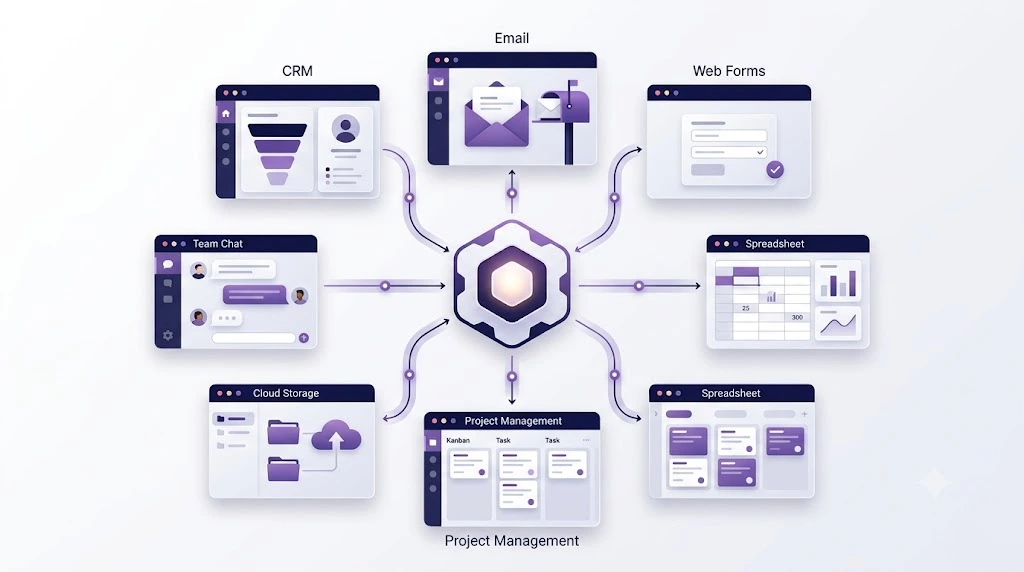
No-code integration tools are platforms that let two or more apps talk to each other automatically. You set a simple rule—”when this happens in App A, do that in App B”—and the tool handles the rest in the background using app automation and workflow automation logic, not custom scripts.
Think of it like a translator standing between two apps that don’t naturally understand each other. Instead of hiring someone to build that translator, you drag, drop, and connect—which is exactly why no-code integration tools have become the default choice for non-technical teams.
Small business owners, freelancers, and marketing teams use these no-code automation tools every day for things like
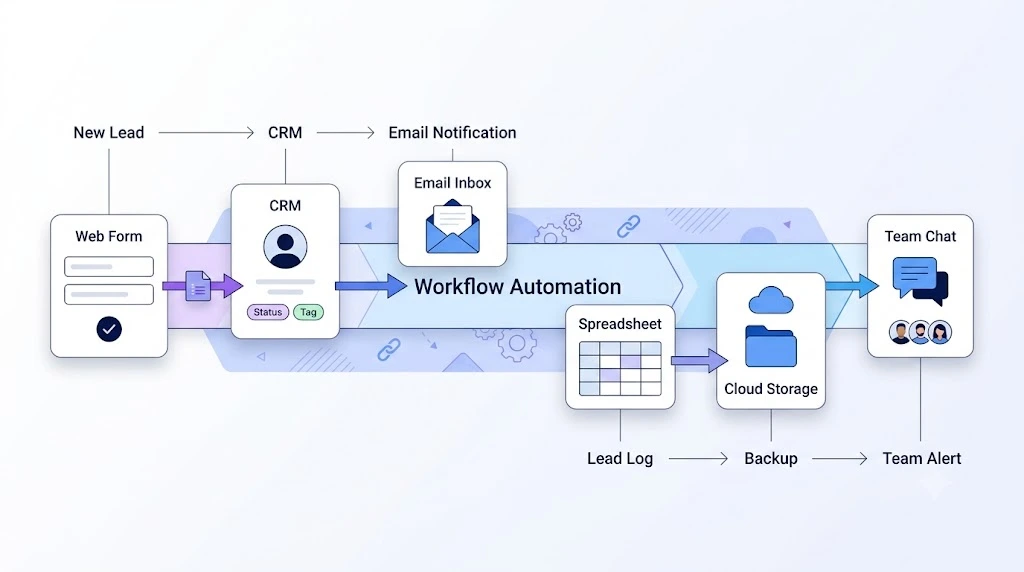
- Sending a new lead from a web form straight into a CRM
- Saving email attachments automatically to cloud storage
- Posting a new blog update to every social channel at once
- Sending a Slack alert the moment a payment comes in
If you’re building out a broader business automation strategy for a small business, app integrations like these are usually the fastest win—they take hours to set up, not weeks.
How to Connect Apps Without Coding Skills: A Step-by-Step Walkthrough
If you’ve never built an automation before, it feels intimidating. It isn’t. Here’s the process broken into four steps you can follow today.
Step 1: List the Apps You Actually Want Connected
Before opening any tool, write down your daily busywork. Are you copying form entries into a spreadsheet? Manually forwarding emails? Re-typing order details into another system? Every repeated, manual step is a candidate for workflow automation.
Step 2: Pick the Right No-Code Integration Tools for Your Workflow
Not every tool suits every business. A solo freelancer needs something different from a 50-person sales team. Look at three things before choosing: how many apps it supports, how it prices its plans, and whether it can handle multi-step workflows, not just simple one-to-one triggers. See the comparison table below for a direct breakdown.
Step 3: Build Your First Workflow (Start Small)
Pick one repetitive task. Set a trigger (“new form submission”), then an action (“add row to spreadsheet”). Most platforms show this as a visual flowchart, so you can see exactly what happens and when. Resist the urge to build something complicated on day one—a simple two-step automation that actually works beats a ten-step one that breaks.
If your first workflow is marketing-related—say, routing new leads from a landing page—it pairs well with a solid content marketing and SEO plan, since automation only helps once there’s traffic and leads worth automating.
Step 4: Test It, Then Let It Run
Send yourself a test entry. Watch it move through the workflow. Fix anything that looks off, then turn it on for real. Check back after a week to confirm it’s still firing correctly—apps update their systems, and occasionally a connection needs reconnecting.
Best No-Code Integration Tools for Small Businesses in 2026
Choosing between the leading no-code integration tools comes down to your budget, technical comfort, and workflow complexity. Here’s a direct comparison of the four platforms that come up most often in 2026 for app-to-app integration. The Zapier figure below was checked directly against Zapier’s own pricing page and official blog. The Make and Pabbly Connect figures were cross-checked across multiple independent 2026 reviews (not fetched from Make’s or Pabbly’s own pricing pages directly), and all three were consistent across sources at the time of writing. Pricing and limits still change periodically, so confirm the current numbers on each tool’s own pricing page before you commit to a paid plan.
| Tool | Best For | Difficulty | Free Plan | Strength | Limitation | Best Use Case |
|---|---|---|---|---|---|---|
| Zapier | Beginners, non-technical teams | Easy | 100 tasks/month, 2-step Zaps only | Largest app library (7,000–8,000+ integrations), fastest setup | Per-task pricing rises quickly once you move beyond simple 2-step workflows | Quick, simple automations across mainstream SaaS apps |
| Make | Teams needing visual, branching workflows | Medium | 1,000 operations/month, 2 active scenarios | Visual Canvas handles conditional logic and routers natively, generally cheaper per operation than Zapier. | Steeper learning curve than Zapier for total beginners; “operations” pricing takes some getting used to | Multi-step workflows with branching logic on a budget |
| n8n | Technical teams, developers, agencies | Advanced | Free if self-hosted (unlimited workflows); paid cloud tiers available | Open-source, self-hostable, full data control, strong AI/agent features | Requires more setup time and technical comfort; fewer native pre-built integrations than Zapier | Complex, high-volume automations and AI agent workflows |
| Pabbly Connect | Budget-conscious small businesses | Easy | 100 tasks/month free | Doesn’t bill for triggers, filters, or internal steps—only actions count as tasks; low-cost paid and lifetime plans | Smaller integration library and community than Zapier | Startups and solo founders automating on a tight budget |
A short note on n8n: although it does offer a visual, drag-and-drop workflow builder, it’s genuinely better suited to technical users or teams with some development comfort than to complete beginners. If you’ve never built an automation before, Zapier, Make, or Pabbly Connect will get you moving faster.
A quick reality check on pricing models: Zapier and Pabbly typically bill per completed action (“task”), Make bills per “operation” (recently renamed “credit”), and n8n’s self-hosted option bills per server cost rather than per task at all. For a workflow that runs thousands of times a month, that difference alone can change your total cost significantly—worth mapping out before you commit to a paid plan.
Common Mistakes to Avoid When Connecting Apps Without Code
Search “no-code integration tools,” and you’ll find dozens of listicles ranking platforms by feature count. Fewer of them mention the two things that actually trip people up:
- Rate limits. Most no-code integration tools cap how many automation runs you get per month on their free and low-tier plans—Zapier and Pabbly Connect both cap-free usages at 100 tasks/month, for instance. Businesses build a great workflow, then get blindsided when it stops running mid-month. Check the official pricing page of your chosen tool before scaling a workflow you depend on.
- Data mapping errors. When two apps use different field names for the same thing (say, “Full Name” vs. “Contact Name”), automations can silently send data to the wrong place. This is a common reason first automations fail quietly, and it rarely gets mentioned in beginner guides.
Knowing these two traps upfront saves you the debugging session most beginners go through in week one.
What Users and Community Discussions Say About Connecting Apps Without Code
Beyond marketing pages, real user discussions on review sites and developer communities reveal patterns about no-code integration tools that official documentation doesn’t always mention:
- On G2’s community discussion boards, users repeatedly note that Zapier’s onboarding wizard makes first-time setup fast, with some teams reporting full implementation within about two weeks for a small business use case. Source: G2 Make vs. Zapier discussions
- Developer-focused write-ups on DEV Community comparing Zapier and Make in real-world testing found that identical e-commerce workflows took noticeably different setup times between the two platforms, reinforcing that “best” depends on workflow complexity, not brand reputation. Source: DEV Community, Make vs. Zapier real-world testing
- A recurring theme across automation-focused forums and subreddits: people recommend starting with one workflow, testing it thoroughly, and only adding more once that one runs reliably for a few weeks—rather than building an entire automation stack on day one.
- Budget-conscious users on comparison threads frequently point out that once usage climbs past a free plan’s limits, costs can rise faster than expected, particularly with per-task or per-operation billing—a common enough observation that it’s worth checking a tool’s paid-tier pricing before scaling.
These are the kinds of lessons usually learned through trial and error—worth keeping in mind before you build your tenth automation. If your automations are feeding ad campaigns, it’s also worth watching your customer acquisition cost before scaling Meta ad spend, since automated lead routing can hide a rising CAC if no one’s watching the numbers.
Frequently Asked Questions
What is a no-code integration tool?
A no-code integration tool is software that connects two or more apps so they share data automatically, without requiring any programming knowledge. You set up rules through a visual interface instead of writing code.
How do I connect apps without coding experience?
Choose a no-code automation platform, pick the two apps you want linked, set a trigger and an action, and test the workflow before turning it on fully. Most platforms guide you through this with templates.
Are no-code integration tools free to use?
Zapier and Pabbly Connect both offer free plans capped at 100 tasks/month, and Make offers a free plan with 1,000 operations/month. Paid plans unlock higher limits, multi-step workflows, and priority support.
What is the best no-code integration tool for beginners in 2026?
Among the most popular no-code integration tools, Zapier is generally considered the easiest starting point for non-technical users because of its large template library and simple linear workflow builder. Make suits users ready to build branching, multi-step automations, and n8n fits technical teams that want full control and self-hosting.
Can no-code tools replace a developer for app integrations?
For everyday tasks, such as moving data, sending alerts, and syncing records, usually yes. For highly custom integrations involving unusual data structures or proprietary systems, a developer may still be needed.
Why does my automation stop working after a while?
This usually happens because of expired app permissions, changed field names in one of the connected apps, or hitting a plan’s monthly usage limit. Checking the workflow’s run history in your platform will usually reveal the exact cause.
Final Thoughts
Connecting your apps with no-code integration tools isn’t about chasing every automation you can think of. It’s about removing the two or three repetitive tasks eating up your week, one simple workflow at a time. And if you ever need a partner to help scale that automation across a business—say, through a non-competing strategic partnership—the workflows you build now are the same ones you’ll hand off later. Start small, test properly, and let the tool do the boring work—so you can get back to the work that actually matters.






Hello http://gofundscale.com,
I hope you’re doing well. I came across your business online and thought you might be interested in improving your visibility and traffic on search engines.
We specialize in helping businesses strengthen their online presence through effective SEO strategies.
Once you share your target keywords and target market, I’ll send a full proposal.
Warm regards,
Ananya
Hi
Submit gofundscale.com in Google’s Search Index and have it be visible in web search results!
Add gofundscale.com today:
helpindex.pro
Hi gofundscale.com,
I came across your website gofundscale.com today and noticed a few things that could be improved to help your pages perform better in Google.
Rather than sending you a generic SEO report, I can point out the specific issues I noticed on your website and explain what I would change.
Would you like me to send you a few of the findings?
If you prefer, we can also set up a short Google Meet call to go through the details together.
Best regards,
SEO Consultant
Hi gofundscale.com,
I came across your website gofundscale.com today and noticed a few things that could be improved to help your pages perform better in Google.
Rather than sending you a generic SEO report, I can point out the specific issues I noticed on your website and explain what I would change.
Would you like me to send you a few of the findings?
If you prefer, we can also set up a short Google Meet call to go through the details together.
Best regards,
SEO Consultant