How to Document Business Processes in a Small Business

Ask a small business owner how an order gets from “yes, I’ll buy” to “delivered,” and you will often hear, “I’ll just do it myself.” That works until you are sick, on holiday, or hiring your first assistant.
Learning how to document business processes in a small business fixes this. Once the work is written down, anyone can follow it, and you stop being the only person who knows how things run.
In this guide, you will get a step-by-step method, a template you can copy today, and a worked example you can adapt. No special software is needed.
What Is Business Process Documentation?
Business process documentation is a written record of how a piece of work gets done: who does what, in which order, with which tools, and what “done” looks like.
Think of it as a recipe for your business. A new team member should be able to read it and complete the task without calling you.
It also supports growth. When work is standardized, it becomes easier to train people and keep quality steady, which is a big part of how to scale a small business without increasing costs.
Business process documentation vs. SOPs
A process document shows the big picture: the start, the end, the people involved, and the flow between them. A standard operating procedure (SOP) goes deeper into one task, with exact instructions.
Most small businesses need both, and the process document usually comes first. If you want to speed up the SOP part, a tool can help you draft them. Here is our look at the best AI SOP generator for small businesses.
Which business processes should you document first?
Start with work that repeats often, causes errors, or depends on one person. Good first picks include:
- Taking and fulfilling customer orders
- Onboarding a new client or employee
- Sending invoices and following up on payments
- Handling customer complaints or refunds
Pick one. Finish it. Then move to the next.
How to Document Business Processes in a Small Business
Here is how to document a business process step by step. Each step includes a quick example, so you can see it in action.
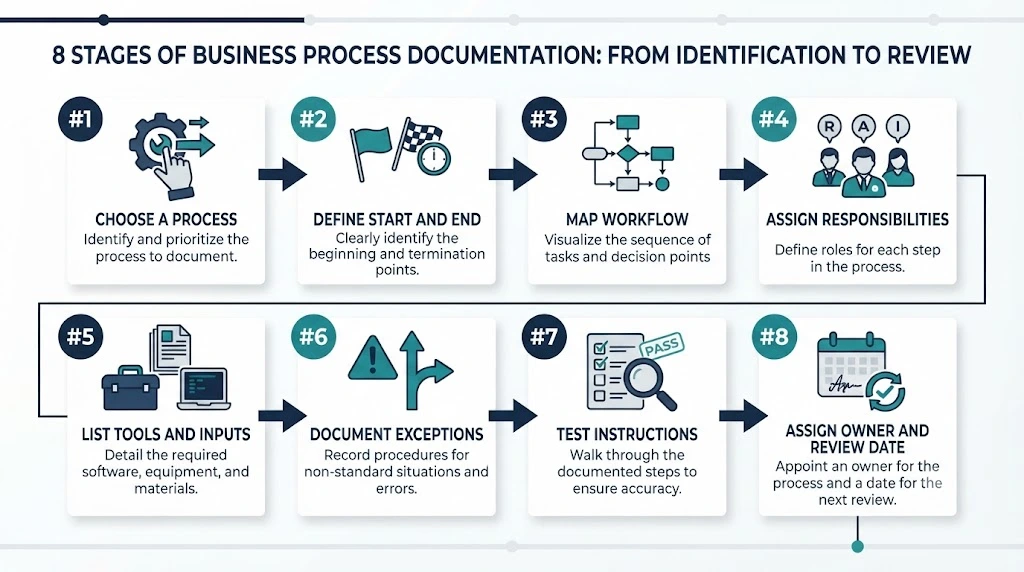
1. Choose One Process to Document
Do not try to write down the whole business at once. Choose one process that matters and is clear enough to describe.
Example: A small online shop picks “processing a customer order” because mistakes there lead to late deliveries and unhappy buyers. A consultancy might pick a repeatable lead-handling flow instead, such as the one in our guide to building a repeatable B2B sales process for a small business.
2. Define the Process Start and End Points
Every process needs a clear trigger and a clear finish. Without them, documents grow endlessly.
Example: The order process starts when a payment confirmation arrives. It ends when the order is marked as shipped, the tracking details are recorded, and the customer receives the tracking email.
3. Map the Steps in the Current Workflow
Write down what happens today, not what should happen. Watch someone do the task, or do it yourself and note each action. Use short lines such as “Check stock” or “Print packing slip.” If you prefer a visual map, ASQ’s flowchart guide explains the basics and suggests that the people who perform the process help draw it.
Example: The owner walks through three recent orders and lists every action, from the first email to the final tracking update.
4. Identify Who Is Responsible for Each Step
Next to each step, write a role or a name. If two people share a step, say who makes the final call.
Example: The store assistant packs orders. The owner approves refunds. Both are written beside the steps they cover.
5. Record the Tools, Inputs, and Decisions Required
List what someone needs to complete each step: software, logins, forms, files, or information. Note any “if this, then that” decisions.
Example: To pack an order, the assistant needs the order sheet, the stock list, and the courier portal login. If an item is out of stock, they message the customer before shipping.
6. Document Exceptions and Common Problems
Real work rarely follows the ideal path. Write down what to do when things go wrong, because that is where new staff tend to get stuck.
Example: If the address looks incomplete, the assistant holds the order and emails the customer. If payment fails, the order stays unpacked.
7. Test the Document With Someone Else
Ask a person who does not usually do the task to follow your document. Watch where they hesitate or ask questions. Those spots need clearer wording. AHRQ’s flowchart guide gives the same advice for process maps: check them with the people actually involved.
Example: A part-time helper packs a test order using only the document. They are unsure which courier to pick for heavy parcels, so the owner adds a line covering that.
8. Assign an Owner and Review Date
Someone should be responsible for keeping the document correct. Add their name and a date when it will be checked again.
Example: The owner is named as the process owner, with a review date set three months out.
What to Include in a Business Process Document
A good document is complete but short. These are the parts worth including.
Process Name and Purpose
Give the process a plain name and one sentence on why it exists. This helps readers decide if they are in the right document.
Process Owner and Responsibilities
Name the person accountable for the document, and list who performs each part of the work.
Required Inputs, Tools, and Access
Note what must be ready before starting: files, forms, systems, and permissions. Missing access is a common reason work stalls.
Step-by-Step Instructions
Use numbered steps, one action per line. Start each with a verb, such as “Open,” “Check,” or “Send.”
Decision Points and Exceptions
Spell out the choices and what to do for each one. Include who to contact if the problem is outside the document.
Expected Outcome and Review History
State what a finished job looks like. Add a short log showing when the document was last updated and why.
Simple Process Documentation Template for Small Businesses
You do not need fancy software. This simple process documentation template works in Word, Google Docs, or even a shared note. Copy it, fill in each field, and keep it short.
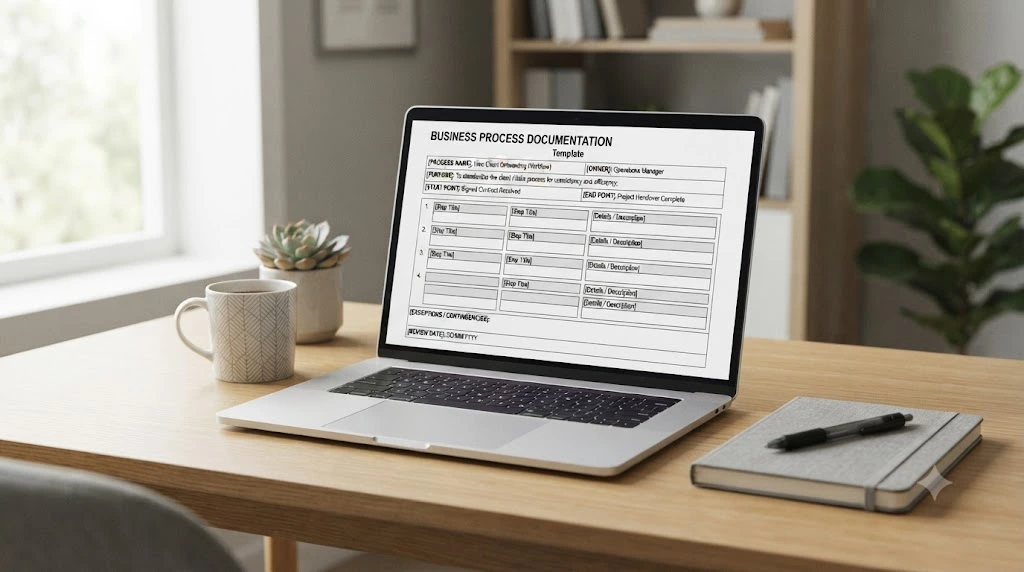
PROCESS DOCUMENT

Process name:
Purpose:
Process owner:
Last updated:
Next review date:

Start point (trigger):
End point (outcome):

Roles involved:
Tools, inputs and access needed:

Step-by-step instructions:
1.
2.
3.
4.

Decision points:
- If ______, then ______.

Exceptions and common problems:
- Problem:
  What to do:
  Who to contact:

Expected outcome:
Review history (date, change, who):
Here is what each field is for:
- Process name: A plain label people can search for.
- Purpose: One sentence on why this process exists.
- Process owner: The person who keeps this document correct.
- Last updated / Next review date: Tells readers whether they can trust it.
- Start and end point: Marks where the process begins and finishes.
- Roles involved: Who does which part.
- Tools, inputs, and access: Everything needed before step one.
- Step-by-step instructions: Numbered actions, one per line.
- Decision points: The “if this, then that” choices.
- Exceptions and common problems: What to do when the normal path breaks.
- Expected outcome: What “done” looks like.
- Review history: A short log of changes.
If you plan to write SOPs for individual tasks later, this same layout is a good base for learning how to create SOPs for a small business without starting from scratch.
Business Process Documentation Example
Reading about templates helps, but seeing one filled in helps more. Here are business process documentation examples in action, using one common process.
Note: This is an illustrative example for a fictional small online store. It is not a real customer case.
Example: Processing a Customer Order
Imagine a small shop selling handmade candles online. Two people run it: the owner and one part-time assistant. Orders come in through the website, and the assistant packs and ships them.
The owner decides to write down the order process so the assistant can handle it alone on busy days.
How the Process Document Looks When Filled In
PROCESS DOCUMENT

Process name: Processing a customer order
Purpose: Make sure every paid order is packed correctly and shipped on time.
Process owner: Owner
Last updated: October 10, 2026
Next review date: January 10, 2027

Start point (trigger): Payment confirmation email arrives.
End point (outcome): Order is marked as shipped, tracking details are recorded, and the customer receives the tracking email.

Roles involved:
- Assistant: packs and ships orders
- Owner: handles refunds and stock decisions

Tools, inputs and access needed:
- Order dashboard login
- Stock list (shared spreadsheet)
- Packing materials
- Courier portal login

Step-by-step instructions:
1. Open the order dashboard and select the new order.
2. Confirm payment shows as "Paid."
3. Check each item against the stock list.
4. Pick and pack the items. Add the packing slip.
5. Create the shipping label in the courier portal.
6. Attach the label and hand over the parcel to the courier.
7. Paste the tracking number into the order and mark it "Shipped."
8. Send the customer the tracking email.

Decision points:
- If an item is out of stock, message the owner before contacting the customer.
- If an order is heavy or fragile, follow the business's documented packaging and courier-selection rules.

Exceptions and common problems:
- Problem: Address looks incomplete.
  What to do: Hold the order, email the customer, and wait for a reply.
  Who to contact: Owner, if there is no reply after two days.
- Problem: Payment shows as "Failed."
  What to do: Do not pack. Mark the order "On hold."
  Who to contact: Owner.

Expected outcome: Order packed correctly, shipped with tracking, customer notified.
Review history: October 10, 2026 - First version created by owner.
Common Mistakes the Example Helps Prevent
The filled-in example highlights three practical lessons:
- Handle exceptions: Explain what to do when payment fails or an address is incomplete.
- Make ownership clear: Specify who handles packing, stock problems, and refunds.
- Define completion: State exactly when the process ends so no order is left in an unclear status.
How to Keep Business Process Documentation Updated
A document that nobody updates slowly turns into a risk, because people follow outdated instructions with full confidence. A few habits help.
Assign One Person to Own Each Document
Shared ownership often means no ownership. Name one person per document, even if others contribute.
Update Documents When a Process Changes
Change the document at the same time as the process, not later. A new tool, a new courier, or a new rule is the right moment to edit.
Review Instructions With the People Using Them
The people doing the work notice problems first. Ask them every few months what is unclear, outdated, or missing.
Keep One Current Version Available to the Team
Store the latest version in one shared place. Move old versions to an archive folder so nobody follows them by mistake.
Common Business Process Documentation Mistakes
Most problems come from a handful of repeated errors:
- Packing in too much detail. A document nobody finishes reading will not get used.
- Writing only the ideal workflow. Staff get stuck the first time something unusual happens.
- Not choosing an owner. Documents go stale quietly when no one is responsible.
- Skipping the test. What seems clear to you may not be clear to a new person.
- Keeping old versions beside current ones. Mixed versions cause confusion and errors.
Frequently Asked Questions
What is the easiest way to document a business process?
Do the task yourself and write each action as you go. Then clean it into numbered steps and add roles and exceptions. That is usually quicker than trying to write from memory.
What is the difference between process documentation and an SOP?
Process documentation describes the overall flow of a piece of work. An SOP gives detailed instructions for a specific task inside that flow. Many businesses write the process first, then SOPs for the tricky parts.
Can a small business document processes without special software?
Yes. A Word file, Google Doc or shared spreadsheet is enough to begin. What matters is that the document is clear, easy to find and kept up to date.
How detailed should a business process document be?
Detailed enough for a new person to complete the task, but short enough to read in a few minutes. If a step needs a long explanation, move it into a separate SOP and link to it.
How often should business processes be reviewed?
There is no single schedule that fits everyone. A practical approach is to set a review date for each document and review sooner whenever a tool, role or rule changes.
Conclusion
Knowing how to document business processes in a small business does not require a big project. Start with one important process, such as handling customer orders, and write down how it runs today.
Here are your next steps:
- Copy the template above into Word or Google Docs.
- Fill it in for one process this week.
- Ask someone else to test it and note where they get stuck.
- Name an owner and set a review date.