
Best AI Tools for Creating Business Reports and Summaries in 2026
Putting together a business report usually means pulling numbers from spreadsheets, notes from meetings, findings from research, and updates from a dashboard—then somehow turning all of that into something a manager or client can actually read. It’s repetitive, time-consuming, and easy to get wrong under a deadline.
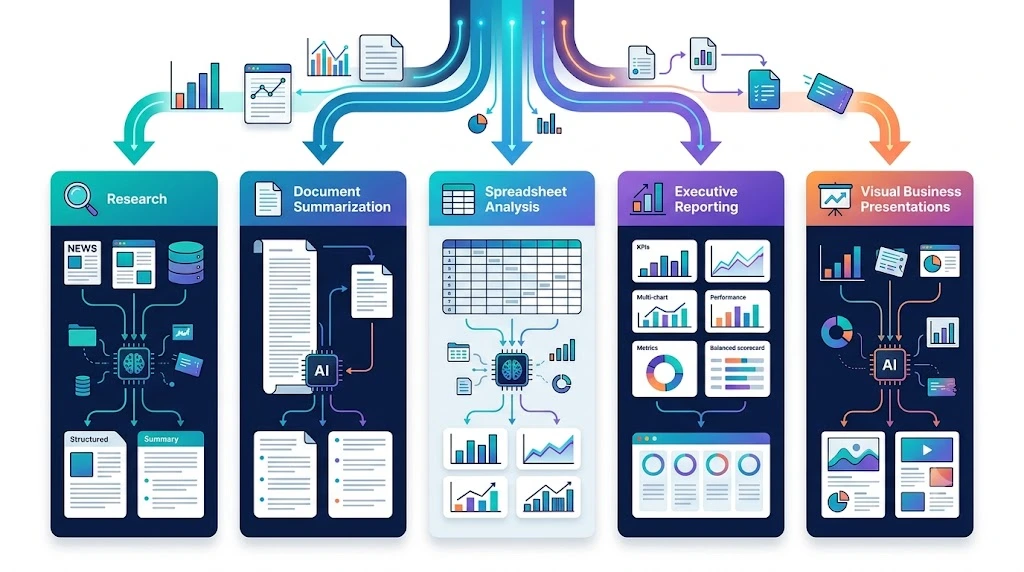
This guide focuses specifically on AI tools that can write, structure, and summarize a report in plain language—not live dashboards that track KPIs in real time. That’s an important distinction, and we’ll come back to it later, because the two categories solve different problems. Report writing is just one piece of a bigger picture, though—many of these same AI workflows are part of a broader business automation push that small businesses are adopting to cut manual work across the board. What follows is a breakdown of which report-writing and summarizing tools are worth using in 2026 and which job each one does best.

Best AI Tools for Business Reports at a Glance
Before diving into the details, here’s a quick side-by-side view. Capabilities here are shown as general strengths rather than absolute yes/no guarantees, since every tool performs differently depending on how it’s used.
| AI Tool | Best For | Report Type | Research | Data Analysis | Summaries | Free Option |
|---|---|---|---|---|---|---|
| ChatGPT | Overall business reports | Written & data reports | Good | Good | Good | Yes. |
| Claude | Long-form, detailed reports | In-depth reports | Good | Good | Good | Yes. |
| Perplexity | Research-backed reports | Source-backed reports | Strong | Limited | Good | Yes. |
| Microsoft 365 Copilot | Word & Excel reports | Office-based reports | Good | Good | Good | Paid |
| Google Gemini | Google Workspace reports | Docs & Sheets reports | Good | Good | Good | Yes. |
| NotebookLM | Internal document summaries | Source-based summaries | Not applicable | Not applicable | Strong | Yes. |
| Gamma | Visual reports & decks | Presentation-style reports | Not applicable | Limited | Good | Yes. |
| Julius AI | Spreadsheet & data reports | Data-driven reports | Not applicable | Strong | Good | Yes. |
Pricing, free-tier limits, and features change often. Always confirm current details on each provider’s official site before choosing a tool for a recurring workflow.
Our Top Picks
Verdicts below are based on each tool’s core design and publicly documented strengths, not on formal side-by-side lab testing—worth keeping in mind as you weigh them against your own workflow. ChatGPT is the most flexible general-purpose choice for most teams, since it handles writing, structure, and basic data reasonably well without a steep learning curve. Claude tends to hold up better once a report runs long or draws on a large amount of source material. Perplexity is the strongest option when a report needs to be backed by current, citable research rather than internal data. Microsoft 365 Copilot and Google Gemini make sense mainly for teams already working inside Word, Excel, Docs, or Sheets. NotebookLM stands apart because it isn’t built to write from a blank page—it summarizes documents you already have. Gamma and Julius AI round things out for visual reports and spreadsheet-heavy analysis, respectively.
ChatGPT — Best Overall for Business Reports
ChatGPT is the most adaptable tool on this list, which is exactly why it works well as a default choice. It can draft a monthly sales report, turn scattered notes into an executive summary, or restructure a data-heavy update into a clear narrative. Concrete use cases include weekly status reports, marketing performance recaps, and first-draft financial summaries that a human then refines.
It’s best for teams that need one tool covering several report types without switching platforms. It’s less ideal when a report depends on very long source documents, since detail can start slipping past a certain length, or when the output needs traceable citations, where a research-focused tool does better. As with any AI tool, numbers should always be checked against the original source before a report goes out.
Claude — Best for Long and Detailed Reports
Claude is the stronger choice once a report stops being a quick summary and becomes a genuine document—internal policy reviews, detailed project retrospectives, or reports built from dozens of pages of source material. It tends to preserve structure and nuance well across longer inputs, which matters when a report needs to stay consistent from the first section to the last.
It’s also useful for building executive summaries out of long documents, pulling out what actually matters without flattening the original tone. This strength with longer, denser material is based on its published context-handling design rather than a formal benchmark run here, so it’s worth testing on your own documents before relying on it for a critical report.
Perplexity — Best for Research-Backed Reports
Perplexity is built around pulling current information from the web and showing where it came from, which makes it well suited to market research reports, competitor analysis, and industry trend summaries—anything where a manager or client is likely to ask, “Where did this number come from?”
It’s not designed for deep internal data analysis or very long-form writing, and it works best alongside a general writing tool rather than replacing one entirely. When a report’s credibility depends on traceable, up-to-date sources, it’s a strong fit for that specific part of the job.
Microsoft 365 Copilot—Best for Word and Excel Users
Copilot is the right choice for teams that already build reports in Word and track numbers in Excel, since it can draft directly inside a document, pull insights from a spreadsheet, and summarize long email threads without leaving the Microsoft ecosystem. Choose it if your reporting process is already built around Microsoft 365 subscriptions and file formats.
Some features are rolled out gradually across plans, so it’s worth checking current availability for your specific subscription tier before assuming a capability is included. Outside of a Microsoft-based workflow, it doesn’t offer a strong reason to switch.
Google Gemini — Best for Google Workspace Users
Gemini plays a similar role for Docs, Sheets, and Drive users—turning a rough outline into a formatted report or summarizing scattered notes with minimal setup. Choose Gemini over ChatGPT or Claude specifically when your report needs to live and update inside a shared Google Doc or Sheet, since it can work with that file directly rather than requiring copy-paste. If your workflow isn’t tied to Google Workspace, a general tool like ChatGPT or Claude will likely serve you just as well.
NotebookLM—Best for Summarizing Internal Documents
NotebookLM works differently from most tools on this list. Rather than generating a report from a blank prompt, it’s designed to ground its responses in the sources you upload—meeting transcripts, research PDFs, internal reports—sticking closely to what’s actually in those documents instead of generating new claims.
That makes it excellent for summarizing material you already have, but it’s not the right tool for writing something from scratch with little source material behind it. It works best as a research assistant that only speaks from what you gave it.
Gamma — Best for Visual Business Reports
Gamma turns a rough outline or block of text into a formatted, visually polished report or slide deck, which makes it useful for reports going in front of a client or leadership team. Beyond formatting, it can also help structure a report’s flow from scratch when you start with only loose notes, not just clean up something already written elsewhere. It’s not built for heavy data analysis, so pairing it with a data-focused tool for the number-crunching stage tends to work well.
Julius AI—Best for Data-Driven Business Reports
Julius AI is built for spreadsheet-heavy reporting. Upload raw data, and it can identify trends, flag anomalies, and turn the analysis into a written narrative rather than just a chart. It’s a strong fit for teams that need a report built primarily around numbers—sales performance, financial variance, or operational metrics—rather than qualitative research or long-form writing. It’s less suited to reports that are mostly narrative with light data involved. For a broader look at how data analysis and reporting fit into a lean operating model, it’s worth understanding how these tools reduce dependence on a dedicated analyst.
How We Evaluated These Tools
Rather than claiming formal, controlled testing of every tool, the picks in this guide are based on each platform’s documented capabilities, how they’re publicly positioned by their own teams, and how well those strengths map to common business reporting needs. The criteria considered were report quality and structure, accuracy and reliability, research and citation handling, ability to manage long documents and large datasets, ease of use, and pricing, including whether a genuinely usable free plan exists.
No single tool scored well across every category, which is why this guide separates recommendations by use case rather than naming one universal winner.
Best AI Tool for Each Type of Report
Different reports call for different strengths, so here’s a faster way to match the tool to the task.
| Report Type | Best Choice |
|---|---|
| General business report | ChatGPT |
| Long, detailed report | Claude |
| Sales report | ChatGPT or Julius AI |
| Marketing performance report | ChatGPT |
| Financial report | Julius AI or Copilot |
| Market research report | Perplexity |
| Competitor analysis report | Perplexity |
| Project status report | ChatGPT or Gemini |
| Executive summary | ChatGPT or Claude |
| Internal document summary | NotebookLM |
| Spreadsheet/data report | Julius AI |
| Word-based report | Microsoft 365 Copilot |
| Google Docs report | Gemini |
| Visual report or deck | Gamma |
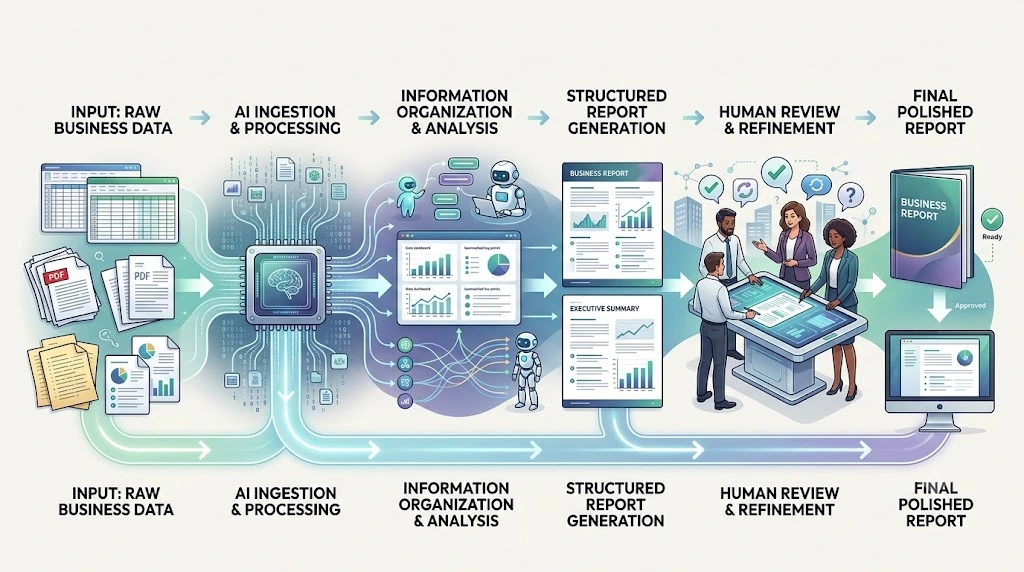
How to Create a Business Report With AI
Once you’ve picked the right tool, the process itself is fairly consistent across platforms.
- Define the report’s objective—decide what decision or update it needs to support before writing anything.
- Identify your audience—an executive summary and a detailed operations report need very different depth.
- Gather your source material—spreadsheets, notes, past reports, or research.
- Upload or paste the data into your chosen tool.
- Ask the AI to analyze the information first, before generating any written content.
- Review the proposed structure and adjust it before the full draft is generated.
- Generate the executive summary separately so it stays sharp rather than just a shortened copy of the full report, then verify every number and edit the tone before sending it out.
Report Generator vs. Reporting Dashboard: Knowing the Difference
It’s easy to lump “AI reporting tools” together, but there’s a real difference between the two categories.
| AI Report Generator | Reporting Dashboard | |
|---|---|---|
| Input | Documents, data you provide | Live, connected data sources |
| Output | Written narrative report | Charts, KPIs, visual metrics |
| Update frequency | On demand | Continuous / real-time |
| Best for | Explaining what happened and why | Monitoring ongoing performance |
If you need a document that explains what happened and why, a report generator like the ones covered here is the right fit. If you need an always-updated view of live metrics, a dashboard tool serves a different purpose entirely, and confusing the two is a common reason people end up disappointed with a tool that was never built for the job they needed. Many growing teams end up using both—a report generator for narrative updates and a dashboard for the numbers that need constant tracking.
Can AI Be Trusted to Write Business Reports?
AI can genuinely speed up the reporting process, but it shouldn’t replace human judgment on anything that matters. Numbers and calculations should always be checked manually before reaching a decision-maker, and any external facts or statistics need independent verification rather than being taken at face value.
Before uploading confidential business data into any AI tool, check that platform’s specific privacy policy and data-retention settings—some tools allow you to opt out of having your inputs used for model training, while others don’t offer that option at all. Reviewing this setting takes a few minutes and matters more than most people assume once real business data is involved. A human review before publishing or presenting a report isn’t an optional step to skip when you’re in a hurry—it’s the step that protects the report’s credibility.

Which AI Tool Should You Choose?
| If you need… | Choose |
|---|---|
| One flexible tool for most report types | ChatGPT |
| Long or source-heavy reports | Claude |
| Citable, research-backed content | Perplexity |
| Word/Excel-based workflow | Microsoft 365 Copilot |
| Google Docs/Sheets workflow | Gemini |
| Summaries grounded in your own documents | NotebookLM |
| Presentation-ready visual reports | Gamma |
| Spreadsheet-heavy data reports | Julius AI |
Frequently Asked Questions
Which AI is best for creating business reports? ChatGPT is the strongest general-purpose option for most business reports, while Claude is better suited to longer or more detailed documents.
Can AI create a business report from Excel data? Yes. Microsoft 365 Copilot and Julius AI can both read spreadsheet data directly and turn it into a written report, with Julius AI focused specifically on data-heavy analysis.
What is the best AI for summarizing business reports? NotebookLM is particularly strong at summarizing existing documents, since it’s designed to stay grounded in the exact sources you upload rather than generating new claims.
Can ChatGPT write a professional business report? Yes. ChatGPT can draft professional reports across most common formats, though numbers and factual claims should always be reviewed against source material before sharing them externally.
Which AI is best for executive summaries? Both ChatGPT and Claude handle executive summaries well, with Claude generally holding up better when the source material is especially long or dense.
Can AI generate reports from PDFs and documents? Yes. NotebookLM and Claude can both process uploaded PDFs and use them as the basis for a summary or report, though NotebookLM stays more strictly grounded in the uploaded text.
What is the best free AI tool for business reports? ChatGPT’s free tier covers many basic reporting needs, and NotebookLM is also free for document summarization—though free-tier limits change regularly, so it’s worth checking current terms directly.
Are AI-generated business reports accurate? Accuracy depends heavily on the quality of the source data provided and whether a human reviews the output before it’s used, rather than being a fixed property of any one tool.
Final Thoughts
Match the tool to the report in front of you rather than the one with the longest feature list. Use ChatGPT for general reports, Claude when things get long or complex, Perplexity when research credibility matters, and NotebookLM or Julius AI when you’re working strictly from documents or spreadsheets you already have. That single decision saves more time than any prompt template will.