
10 Best AI Customer Support Tools for Small Businesses in 2026
Picking a support tool used to mean choosing between three or four help desks that all did roughly the same thing. That’s not true anymore. Every vendor now claims an “AI agent,” and the gap between a tool that quietly resolves tickets and one that just auto-replies with generic text is bigger than most product pages let on.
If you run a small team, you already know the real problem isn’t a lack of options—it’s picking the right one without burning a month on trials and demos.
A few things make this harder than it should be:
- A small team can’t staff round-the-clock coverage, but customers still expect fast replies at 11 p.m.
- The same five or ten questions come in on repeat, eating hours that should go toward actual work.
- Support requests now arrive from email, live chat, Instagram DMs, and WhatsApp—often for the same customer.
- Hiring a second or third support hire is expensive long before it’s justified by ticket volume.
- Most “AI chatbots” still can’t actually resolve anything—they just reroute the same question to a human anyway.
Here’s the one thing worth understanding before you compare a single tool:
The best AI customer support tool isn’t the one with the longest feature list. It’s the one that matches your ticket volume, your budget, your main support channel, and the way your team already works.
That’s the lens this guide uses—not “which tool has the most AI,” but “which tool fits a business like yours.”

What we mean by “small business”: For this guide, we’re primarily talking about lean teams with roughly 1–20 employees and limited (or no) dedicated customer-support staff. If your team is larger or has a support ops function already, several picks here still apply, but you may also want to weigh enterprise-tier plans not covered in depth below.
Quick Answer: Best AI Customer Support Tools at a Glance
Short on time? Here’s the shortlist. Full breakdowns, pricing details, and honest trade-offs are below.
| Tool | Best For | Free Plan? | Starting Paid Cost | Standout AI Feature | Best Channel | Setup Difficulty |
|---|---|---|---|---|---|---|
| Freshdesk | Overall small business pick | Limited (1–2 agents, 6 mo.) | ~$19/agent/mo | Freddy AI ticket suggestions & routing | Email + chat | Easy |
| Gorgias | Ecommerce & Shopify stores | No | From $10/mo + ~$0.90/resolved AI interaction | AI agent edits orders & manages returns. | Live chat + email | Easy |
| Zendesk | Scaling SaaS teams | No | From ~$19/agent/mo (ticketing only) | AI-powered resolution & intent detection | Chat + ticketing | Medium |
| Zoho Desk | Budget-conscious teams on Zoho CRM | Yes (3 agents) | ~$7-14/agent/mo | Zia AI (Enterprise tier only) | Email/chat | Easy |
| Help Scout | Best free option for lean teams | Yes (5 users, capped contacts) | ~$25/user/mo | AI drafting & summarization | Shared inbox/email | Easy |
| Tidio | Small e-commerce chat automation | Yes (limited AI use) | From $24.17/mo | Lyro AI resolves common FAQs automatically. | Website chat | Easy |
| Fin by Intercom | Businesses that already have a help desk | No (14-day trial) | Usage-based, from ~$0.99/resolution | Autonomous AI agent across any help desk | Omnichannel | Medium |
| HubSpot Service Hub | Teams already using HubSpot CRM | Yes (CRM + basic ticketing, no AI agent) | Starter from ~$7-15/seat/mo promo; Pro ~$90/seat/mo; Enterprise ~$150/seat/mo | Unified customer + support data | Email/chat | Medium |
| LiveAgent | WhatsApp & multichannel support | No (30-day trial) | From $19/mo ($13/mo promo, annual) | Ticket routing across social media and WhatsApp | WhatsApp and social | Medium |
| HappyFox | Growing support teams | No | Help Desk from $24/agent/mo + HappyFox AI from $14/agent/mo | Workflow automation + SLA management | Omnichannel | Medium |
A note on pricing: every vendor above changes plans and limits often, and several charge separately for AI usage on top of the base seat price. “Free” plans in particular tend to come with tighter caps than they used to—on contacts, users, or AI usage. Treat these numbers as a starting point and confirm current pricing and plan limits directly on the vendor’s site before you commit.
How We Evaluated These AI Customer Support Tools
Rankings that only compare “features” miss what matters most to a small team: total cost, real setup time, and whether the AI can resolve something or just suggest a reply. Here’s the criteria used for every tool on this list.
1. AI Resolution Capability
Not all “AI” does the same job. Some tools only suggest an answer for a human to approve. Others resolve full conversations end-to-end, and a smaller group can take real action—like updating an order or issuing a refund—without a human touching the ticket. One thing worth flagging: vendors don’t all define “resolution rate” the same way, so treat any single vendor’s advertised percentage as a starting point rather than an apples-to-apples number, and ask how they measure it before you compare tools on that basis.
2. Total Cost for a Small Business
The advertised “starting price” rarely reflects what you’ll pay. A realistic monthly total usually looks like
Total Monthly Cost = Base Plan + Agent Seats + AI Usage/Resolution Fees + Add-ons
(More on where this trips people up in the pricing breakdown further down.)
3. Setup Time
Some tools go live in under an hour with no technical help. Others need a developer, a data import, and several days of configuration before the AI is set up well enough to be useful.
4. Knowledge Base Quality
How easily can the AI actually be set up on your business content? The stronger tools pull from your website, help center, PDFs, product docs, and past support tickets—without manual re-entry.
5. Human Handoff
What happens is the moment AI can’t answer, something matters more than the AI itself. Does the conversation transfer with full context, or does the customer have to repeat everything to a human agent?
6. Integrations
For a small business, this usually means an e-commerce platform, CRM, email, calendar, and messaging apps like WhatsApp or Instagram.
7. Real-World Small Business Fit
The real question isn’t “Is this a good tool?”—it”‘s “Can a 2–20 person team actually run this without a dedicated admin?” We prioritized tools that make sense for lean teams, not platforms that require a dedicated support administrator to configure and maintain.
For businesses using content as a customer-acquisition channel, a well-organized knowledge base can also support both SEO and customer self-service—the same documentation that powers your AI’s answers is often the foundation of a content marketing and SEO strategy.
The 10 Best AI Customer Support Tools for Small Businesses in 2026
1. Freshdesk—Best Overall AI Customer Support Tool for Small Businesses
Best for: Teams that want a full help desk plus AI features without an enterprise price tag.
Why we picked it
- Freddy AI drafts replies, summarizes long threads, and routes tickets automatically
- A low-cost entry point for teams that want a real help desk, not just a stripped-down trial
- Clean interface with a relatively short learning curve for new users
- Strong knowledge base tools for self-service deflection
Key AI features
- AI-suggested replies based on past resolved tickets
- Automatic ticket tagging and priority detection
- Chatbot deflection for common questions
Pros: Easy to set up, reliable automation rules, good value at the entry tier. Cons: More advanced AI resolution features sit behind higher-priced plans, and Freddy AI itself is billed as a separate add-on (a per-agent Copilot fee plus per-session charges for the customer-facing AI agent) rather than bundled into the base price. Pricing: A limited free tier is available for a small number of agents; paid plans start around $19/agent/month billed annually, with Freddy AI Copilot and AI Agent sessions priced separately on top. Confirm current free-tier limits and AI add-on costs on Freshdesk’s pricing page before you budget. Setup difficulty: Easy Best for these businesses: Local businesses, small SaaS teams, agencies Our verdict: If you only have budget and patience for one tool, Freshdesk is one of the strongest starting points—it does the basics well and grows with you, though it’s worth pricing out the Freddy AI add-ons before you commit if AI resolution is a priority from day one.
Choose this if: You want one well-rounded help desk that covers ticketing, chat, and a knowledge base without an enterprise price tag. Skip this if AI resolution is your top priority from day one—Freddy AI’s add-on pricing can add up fast, and other tools bundle AI more predictably.

2. Gorgias—Best for Ecommerce Businesses
Best for: Shopify and other e-commerce stores that get repetitive order and returns questions.
Why we picked it
- Built specifically for e-commerce, not adapted from a generic help desk
- The AI agent can edit orders, process returns, and check shipping status directly
- Deep integration with Shopify, WooCommerce, and similar platforms
Key AI features
- Order lookup and editing inside the chat
- Automated “Where is my order” (WISMO) resolution
- Revenue tracking tied to support conversations
Pros: Purpose-built for online stores, strong automation for the most common e-commerce questions. Cons: Less useful outside e-commerce; the AI Agent bills per resolved interaction on top of the base plan, so cost scales with automation volume. Pricing: Helpdesk plans start around $10/month for a limited number of tickets, with per-ticket overage charges. The AI Agent is a separate usage-based add-on available on all plans, priced at roughly $0.90 per resolved interaction ($1.00 on the Starter plan). Confirm current rates on Gorgias’s pricing page, as usage-based AI pricing shifts periodically. Setup difficulty: Easy: Best for these businesses: Shopify stores, DTC brands, small online retailers Our verdict: For stores with a high volume of order and returns questions, its ecommerce-specific automation can make the higher support volume much easier to manage.
Choose this if: You run a Shopify or WooCommerce store, and most of your tickets are order status, shipping, or returns. Skip this if: You’re not e-commerce—the platform’s strengths are built specifically around order and store data that non-retail businesses won’t use.
3. Zendesk — Best for SaaS Companies
Best for: Small SaaS teams whose customers ask detailed, technical questions.
Why we picked it
- Strong knowledge-base-driven AI resolution for technical support
- Scales cleanly as ticket volume and team size grow
- Wide integration ecosystem for product and engineering tools
Key AI features
- Intent detection and automatic routing
- AI-generated macros based on resolved tickets
- Bot escalation with full context handoff
Pros: Reliable for technical, knowledge-heavy support; strong reporting. Cons: The $19/agent entry plan covers ticketing only—AI resolution requires moving to a Suite plan plus a separate AI add-on, and per-resolution fees apply on top of that. Pricing: Entry ticketing plans start around $19/agent/month; Suite plans with AI capability run higher, plus a per-agent AI add-on and per-resolution usage fees. Confirm current tiers directly with Zendesk, as this has changed more than once in 2026. Setup difficulty: Medium Best for these businesses: Early-stage SaaS, technical products, subscription services Our verdict: A strong pick once your support questions get more technical than “where’s my order.”
Choose this if: Your customers ask detailed, technical questions, and you expect to scale a support team over time. Skip this if: You’re budget-sensitive—Zendesk’s real cost, once Suite plans, AI add-ons, and per-resolution fees are added and run meaningfully above the $19 entry price.
4. Zoho Desk — Best Budget-Friendly AI Support Tool
Best for: Small businesses already using Zoho CRM, or anyone who wants a free entry point.
Why we picked it
- A usable free plan with real ticketing functionality
- Zia AI handles sentiment analysis and auto-tagging on the higher-tier plan
- Tight integration if you’re already in the Zoho ecosystem
Key AI features
- Sentiment detection on incoming tickets
- Auto-suggested responses from your knowledge base
- Basic automation workflows
Pros: Excellent value, especially for existing Zoho users. Cons: The full Zia AI suite (sentiment analysis, auto-tagging, and Answer Bot) is bundled into the top-tier Enterprise plan rather than the free or entry-level plans, so budget-focused teams may not get AI resolution depth without upgrading. Pricing: Free plan available for a small number of agents; paid tiers are priced competitively against other mid-market tools, with Zia AI reserved for the top tier. Confirm current tier limits on Zoho’s pricing page. Setup difficulty: Easy: Best for these businesses: Startups, budget-conscious local businesses, Zoho CRM users Our verdict: The best option if cost is your primary filter and you don’t need heavy AI automation yet.
Choose this if the budget is the deciding factor, or you’re already using Zoho CRM and want tight integration. Skip this if AI resolution depth matters now—real Zia AI features sit behind the Enterprise tier, not the free or entry plans.
5. Help Scout—Best Free AI Customer Support Tool
Best for: Very small teams that want a clean shared inbox with light AI assistance.
Why we picked it
- A free plan for up to five users, not a 14-day trial
- Simple, human-feeling shared inbox rather than a complex ticketing system
- AI drafting and summarization without a steep learning curve
Key AI features
- AI-assisted reply drafting
- Conversation summarization for handoffs
- Basic workflow automation
Pros: Extremely easy to use, minimal onboarding needed. Cons: Not built for high ticket volume or deep automation; the free plan also caps monthly contacts, so busier teams outgrow it quickly. Pricing: Free for up to 5 users, with a monthly contact limit on that tier; paid plans remove the contact cap and scale from there. Setup difficulty: Easy. Best for these businesses: Solo founders, very small teams, service businesses Our verdict: If you’re testing whether you even need a dedicated tool yet, start here—it costs nothing to find out.
Choose this if: You’re a very small team that wants a simple, email-like shared inbox without a steep learning curve. Skip this if: You expect meaningful ticket volume soon—the free plan’s contact cap and the lack of native SLA management will show up quickly as you grow.
6. Tidio—Best for AI Chatbots and Website Support
Best for: Small businesses that want a website chatbot that actually resolves questions instead of just collecting emails.
Why we picked it
- Lyro AI is configured directly from your existing help content
- No-code chatbot builder that non-technical teams can manage
- A free plan to test the platform before you need to pay anything
Key AI features
- Automated resolution of repetitive FAQs
- Product recommendations pulled from store data
- Visual, drag-and-drop automation builder
Pros: Fast to deploy, budget-friendly, good for lean teams. Cons: The first 50 Lyro AI conversations are a lifetime free allowance, not a recurring monthly quota—once you use them up, ongoing AI resolution moves to a paid, metered quota billed on top of the base plan. Pricing: Free plan available with 50 lifetime Lyro AI conversations included Starter plans begin around $24.17/month (annual billing), with further Lyro AI usage billed as a separate add-on once the free allowance is used. Confirm current rates on Tidio’s pricing page. Setup difficulty: Easy Best for these businesses: Small e-commerce stores, service businesses, solo founders Our verdict: A strong, low-risk way to put AI in front of customers without committing to a full help desk overhaul.
Choose this if: You want a website chatbot that can actually resolve FAQs, not just collect emails, and you don’t need a full ticketing system. Skip this if: You expect steady AI chatbot volume from day one—the free plan’s Lyro allotment is a one-time pool, not a recurring quota.
7. Fin by Intercom — Best AI Agent for Businesses That Already Have a Help Desk
Best for: Businesses with a large volume of repetitive tickets that want AI to fully close the loop, not just draft replies.
Why we picked it
- Works on top of your existing help desk instead of replacing it
- Pay only for resolutions the AI actually closes
- Handles nuanced, longer conversations more naturally than most chatbots
Key AI features
- Autonomous end-to-end ticket resolution
- Works across Zendesk, Salesforce, HubSpot, and other help desks
- Custom tone and response length controls
Pros: You’re not paying for AI that doesn’t work—pricing is tied to actual outcomes. Cons: Usage-based pricing can become unpredictable at scale without close monitoring. Pricing: Usage-based, starting around $0.99 per resolution. Setup difficulty: Medium. Best for these businesses: Growing teams with high ticket volume and an existing help desk Our verdict: If your team already has a help desk and just needs the AI layer, Fin is one of the few tools built exactly for that gap.
Choose this if: You already run Zendesk, Salesforce, HubSpot, or another help desk and want an AI layer that pays only for what it resolves. Skip this if: You want predictable monthly costs—usage-based pricing means your bill scales with success, which can be hard to forecast at higher volume.
Worth knowing: Intercom rebranded to “Fin” in May 2026, and weeks later, in June 2026, Salesforce signed a definitive agreement to acquire the company for roughly $3.6 billion. As of this writing the deal is signed but not yet closed (expected around Salesforce’s fiscal Q4 2027), so pricing and packaging for existing customers haven’t changed—but it’s worth watching for how the acquisition affects Fin’s roadmap once it closes.
8. HubSpot Service Hub — Best for Teams Already on HubSpot
Best for: Small businesses that already run their sales and marketing through HubSpot.
Why we picked it
- Unifies support tickets with existing customer and deal data
- A genuinely free CRM-plus-ticketing tier before you need to pay anything
- One system instead of stitching support software into a separate CRM
Key AI features
- AI-assisted ticket routing and replies
- Customer history pulled directly into support conversations
- Reporting that connects support outcomes to revenue data
Pros: Huge advantage if you’re already in the HubSpot ecosystem. Cons: Less compelling as a standalone pick if you don’t use HubSpot elsewhere, and the free tier covers CRM and basic ticketing only—the AI Customer Agent is not part of the free plan and is billed through HubSpot Credits. Pricing: The free tier includes core CRM and ticketing (no AI agent). Paid seats start around $7-15/seat/month on promotional Starter pricing, with Professional around $90/seat/month and Enterprise around $150/seat/month (annual billing). The AI Customer Agent consumes HubSpot Credits, billed at roughly 50 credits per resolved conversation on top of your seat plan. Confirm current promotional pricing and credit rates directly with HubSpot, as both change periodically. Setup difficulty: Medium Best for these businesses: HubSpot CRM users, growing sales-led businesses Our verdict: Don’t buy this in isolation—but if HubSpot already runs your sales pipeline, this is close to a no-brainer.
Choose this if: Your sales and marketing already run on HubSpot, and you want support data unified with the rest of your customer history. Skip this if: You’re not on HubSpot elsewhere—as a standalone help desk it’s a weaker pick than tools built specifically for support.
9. LiveAgent — Best for WhatsApp Customer Support
Best for: Small businesses where WhatsApp or social messaging is a primary support channel.
Why we picked it
- Supports WhatsApp, Instagram, and Facebook messaging alongside standard channels
- Combines ticketing, live chat, and call center features in one plan
- Straightforward per-agent pricing with no confusing add-ons
Key AI features
- AI-assisted routing across channels
- Automated tagging and prioritization
- Real-time agent availability management
Pros: Strong multichannel support at a fair price. Cons: AI depth is lighter compared to Zendesk or Freddy AI, and WhatsApp is a paid add-on on the two lower tiers rather than bundled in from the start. Pricing: Small business plans start around $19/month ($13/month on annual promotional pricing). WhatsApp integration is available on every plan, but on the Small and Medium tiers it’s billed as a roughly $39/month add-on; it’s included at no extra charge on the Large Business and Enterprise tiers. Confirm current promotional pricing and add-on rates on LiveAgent’s site. Setup difficulty: Medium Best for these businesses: Local businesses, businesses selling through WhatsApp, service providers Our verdict: If most of your customer conversations already happen on WhatsApp, this is a more natural fit than a chat-first tool built for websites.
Choose this if WhatsApp, Instagram, or Facebook messaging is a primary support channel and you also want a call center on the same platform. Skip this if AI resolution depth is a priority—LiveAgent’s AI features are lighter than Freddy AI or Zendesk’s, and social channels can carry add-on fees on lower tiers.
10. HappyFox — Best for Growing Support Teams
Best for: Businesses that have outgrown a basic inbox and need real workflow automation and SLA tracking.
Why we picked it
- Deep workflow automation for teams with more complex ticket rules
- SLA management that keeps growing teams accountable
- AI-assisted agent support without an enterprise-level learning curve
Key AI features
- Automated SLA breach alerts
- AI-assisted agent suggestions
- Custom workflow builder for multi-step ticket handling
Pros: Built for teams that are scaling past the basics. Cons: More setup time than the simpler tools on this list, and real AI capability is spread across several separately priced add-ons rather than bundled into the base plan. Pricing: Help Desk plans start from around $24/agent/month, with higher tiers and unlimited-agent options for larger teams. AI is priced separately in several pieces: HappyFox AI (agent-assist features like summaries and suggested replies) starts from around $14/agent/month, Autopilot (task-automation AI agents) runs as low as $0.02 per action, and the AI Chatbot bills around $0.33 per resolution. Confirm current tiers and rates directly with HappyFox, since AI pricing here is more layered than most competitors. Setup difficulty: Medium Best for these businesses: Growing teams, mid-sized support operations, multi-department businesses Our verdict: The right pick once “small business” starts to mean 15–20 people and a basic inbox can’t keep up anymore.
Choose this if: You’ve outgrown a basic shared inbox and need real SLA enforcement and multi-department workflow rules. Skip this if: You’re a solo founder or very small team—the setup time and feature depth here are built for a scale you may not have reached yet.
AI Customer Support Tool Comparison by Business Type
Different businesses have completely different support needs. Here’s how to map your business type to the right kind of tool.
| Business Type | Best Type of AI Tool | Most Important Feature | Recommended Tool |
|---|---|---|---|
| E-commerce store | AI + order automation | Order tracking and returns handling | Gorgias |
| SaaS company | AI knowledge assistant | Accurate technical answers | Zendesk |
| Local business | AI receptionist / chatbot | Appointment booking | Freshdesk |
| Agency | Shared inbox + AI | Multi-client workflow management | Help Scout. |
| Startup | Affordable, lightweight AI | Low monthly cost | Zoho Desk |
| Shopify store | Ecommerce-native automation | Returns and order edits | Gorgias |
| Service business | Conversational AI | Lead qualification | Tidio |
Which AI Customer Support Tool Should You Choose?
Use this as a quick decision tree if you’re still torn between two or three options.
If you have fewer than 500 support conversations a month Choose a budget-friendly AI chatbot like Tidio or Help Scout. You don’t need heavy automation yet—you need something that’s cheap and fast to set up.
If you run an e-commerce store Choose a tool with order, shipping, and returns integrations built in, like Gorgias. Generic help desks will always feel like they’re missing something.
If your customers ask technical questions Choose a knowledge-base-driven AI agent, like Zendesk, that can actually pull accurate answers from documentation.
If support requests come from multiple channels Choose an omnichannel platform like LiveAgent so you’re not logging into four different inboxes every morning.
If you have little to no dedicated support team Choose an AI-first solution with strong autonomous resolution—Fin by Intercom is a strong option if you already run a help desk; it can layer onto it.
If you already use a help desk Choose an AI layer that integrates with what you have instead of migrating everything to a new system. Fin by Intercom and Freddy AI both fit this approach.
AI Customer Support Pricing in 2026: What Small Businesses Actually Pay
Free AI Support Tools: What You Actually Get
If budget is your main constraint, here’s a quick tool-by-tool look at what the free tiers really include:
- Help Scout—Free for up to 5 users, but capped on monthly contacts. Good for testing whether you need a dedicated tool at all.
- Zoho Desk—Free for up to 3 agents with real ticketing, but the Zia AI features are locked to the paid Enterprise tier.
- Tidio—Free plan available, but Lyro AI comes as a one-time allotment of conversations rather than an ongoing monthly quota.
- HubSpot Service Hub—A usable free CRM-plus-ticketing tier, though the AI agent features are metered and billed separately once you use them.
None of these free tiers is a permanent home for a growing support team—treat them as a way to validate whether AI support is worth paying for before you commit to a paid plan.
$20–$100 per Month Range
This range covers most small teams: a base plan, a handful of agent seats, and light AI automation. Freshdesk, Zoho Desk, and LiveAgent typically land here for a small team.
$100–$500 per Month Range
Growing businesses with more agents, higher ticket volume, or usage-based AI resolution fees (like Fin by Intercom) tend to land in this range once volume increases.
Hidden AI Costs to Watch Out For
The advertised price rarely tells the whole story. Before you commit, ask about:
- Per-resolution or per-conversation AI charges
- Extra agent seat costs beyond the base plan
- Premium integrations that sit behind a paywall
- Knowledge base article or storage limits
- Automation or workflow limits on lower tiers
- API usage fees if you plan to build custom integrations
The headline subscription price rarely tells the whole story. AI usage, resolution fees, seats, and premium integrations can materially change your monthly cost.
Software costs should be evaluated alongside cash flow and scaling economics, especially once a business starts stacking multiple SaaS subscriptions on top of each other.
Is an AI Customer Support Tool Worth It for a Small Business?
Here’s a simple way to run the numbers before you buy anything.
Current support workload (example):
- 1,000 conversations per month
- 5 minutes average handling time per conversation
- 5,000 minutes per month = roughly 83 hours
If AI resolves 30% of repetitive queries:
- 300 conversations automated
- Roughly 25 support hours saved per month
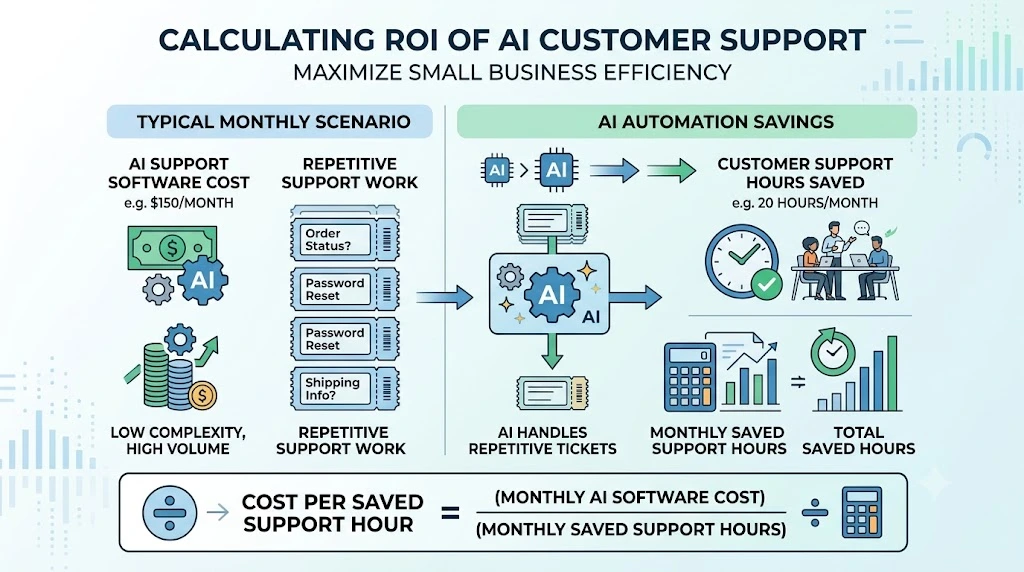
The real comparison: weigh the monthly AI tool cost against the value of those 25 hours—whether that’s freeing up an existing employee for higher-value work or delaying a new hire you’d otherwise need. For a small business handling a meaningful volume of repetitive tickets, this calculation can make the economics of AI support worth testing.
A worked example: Say a small team pays $150/month all-in for an AI support tool (base plan plus AI usage fees), and it saves those same 25 hours a month. That works out to $6 per hour saved—well below what an hour of staff time typically costs once wages, taxes, and overhead are factored in. If the tool instead costs $400/month for the same 25 hours saved, that’s $16/hour, which is a closer call and worth weighing against your actual hourly labor cost before committing. Running this simple math with your own numbers—monthly tool cost divided by hours saved—is a quick way to sanity-check whether a specific plan is worth it before you sign up.
For small businesses, the real value of AI support isn’t simply reducing headcount—it’s increasing the customer volume your existing team can handle without costs rising at the same rate. That’s the same principle behind learning how to scale without increasing operating costs.
What Can AI Actually Automate in Customer Support?
Not everything should go to AI. Here’s a realistic breakdown.
| Customer Task | Can AI Handle It? | Human Needed? |
|---|---|---|
| FAQs | Yes. | Rarely |
| Order status | Yes. | Sometimes |
| Password reset | Yes. | Rarely |
| Refund request | Sometimes | Depends on amount/policy |
| Technical issue | Sometimes | Often |
| Angry customer | Assist only | Usually |
| Complex billing | Limited | Often |
| Account cancellation | Depends | Often |
Recent coverage across the industry keeps circling back to the same point: AI support tools need accurate, current business data and clear boundaries to be reliable—they work best with regular oversight, not as a fully hands-off system.
AI customer support is only one part of a broader automation strategy. Small businesses can also automate lead follow-ups, invoicing, reporting, task assignment, and other repetitive workflows—see this broader business automation strategy for the fuller picture.
The same automation principles can also be applied before a customer becomes a customer, especially for instant responses, qualification, reminders, and human handoff—the framework for automated lead follow-up works the same way.
How to Set Up an AI Customer Support Tool in 7 Steps
Step 1: Identify your top 20 customer questions. Pull these from past emails, chats, or tickets—this becomes the foundation of what your AI is set up to answer.
Step 2: Clean up your FAQ and knowledge base. Outdated or contradictory information is the number one reason AI gives wrong answers.
Before automating customer support, it helps to understand which business processes are worth automating and how to weigh the cost against the time it actually saves.
Step 3: Choose your main support channel. Don’t try to automate five channels at once—start with the one that gets the most volume.
Step 4: Connect your existing tools. Link your CRM, ecommerce platform, or calendar so the AI has real customer context, not just FAQ answers.
Step 5: Set clear AI boundaries. For example: never issue refunds above a set amount, never change account details, always escalate angry customers, and always escalate payment disputes.
Step 6: Test with real customer questions. Run actual past tickets through the AI before it goes live, not hypothetical ones.
Step 7: Monitor and improve every week. Review what the AI got wrong, update the knowledge base, and adjust boundaries as you go.
Common AI Customer Support Mistakes Small Businesses Make
Buying the most expensive tool first. More features you don’t use yet are just wasted budget.
Feeding AI outdated information. If your knowledge base is stale, the AI will confidently repeat the same mistakes.
Automating complex problems too early. Start with FAQs and order status, not refund disputes and account cancellations.
Ignoring human handoff. A bad handoff—where the customer has to repeat everything—undoes most of the goodwill AI just built. A good support workflow shouldn’t end when AI identifies an issue; it should automatically route the task to the right person.
Not tracking AI accuracy. If you’re not measuring how often the AI is right, you’re guessing.
Looking only at subscription price. As covered above, usage and resolution fees often cost more than the base plan.
Using too many AI tools at once. Stacking three different AI tools across channels usually creates more confusion than it solves.
AI Customer Support Metrics You Should Track
Once a tool is live, these are the numbers that tell you whether it’s working:
- AI Resolution Rate—the percentage of conversations the AI closes without a human
- Escalation Rate—how often conversations get handed to a person
- First Response Time—how quickly customers get an initial reply
- Average Resolution Time—how long it takes to fully close a ticket
- Customer Satisfaction Score (CSAT)—direct feedback from customers
- Cost per Resolved Conversation—total spend divided by tickets closed
- AI Error Rate—how often the AI gives an inaccurate or unhelpful answer
- Top Unanswered Questions—a running list of what customers are asking that the AI still can’t handle
AI Customer Support vs. Traditional Chatbots: What’s the Difference?
| Traditional Chatbot | AI Customer Support Agent |
|---|---|
| Script-based | Context-aware |
| Fixed conversation flows | Flexible, natural responses |
| Limited to pre-set FAQs | Pulls from the full knowledge base |
| Basic routing only | Can resolve tasks directly |
| Difficult to update or maintain | Draws from updated knowledge base content |
If you’ve tried a chatbot before and found it frustrating, that’s likely why—most of what shipped a few years ago was script-based, not AI-driven.
Fast responses and automated follow-up can also improve the transition from lead to customer, particularly for small teams—the same idea behind low-cost sales automation.
Are AI Customer Support Tools Safe for Small Businesses?
This is a fair question, and it’s worth taking seriously before you connect an AI tool to real customer data.
- Customer data: Check where conversation data is stored and whether it’s used to train models beyond your own account.
- Access permissions: Limit which systems the AI can actually read from or write to—especially payment and account details.
- Sensitive information: Avoid feeding the AI more customer data than it needs to do its job.
- Hallucinations: Even good AI tools occasionally state something confidently and incorrectly—this is why boundaries and monitoring matter.
- Human approval: For anything involving money or account changes, keep a human in the loop, at least at first.
- Knowledge source control: Make sure the AI is only pulling from sources you’ve approved, not scraping unrelated content.
How to Choose the Right AI Customer Support Tool
Before you sign up for anything, answer these seven questions:
- How many customer conversations do you receive monthly?
- Which channels matter most—email, chat, WhatsApp, or social?
- What are your top repetitive questions?
- Do you need full ticket management, or just a chat widget?
- Do you need AI to simply answer questions or actually take action?
- What is your total realistic monthly budget, including AI usage fees?
- What happens when the AI gets the answer wrong?
If you can’t answer most of these yet, it’s worth spending a week tracking your current support volume before you buy anything. A tool chosen without this context is usually the one that gets abandoned three months in.
Our Final Recommendation
Why Freshdesk wins overall: It offers the strongest balance of entry-level cost, help-desk functionality, AI assistance, knowledge-base support, and room to scale. It isn’t the most advanced AI agent in every category, but it avoids the biggest weakness of most alternatives: requiring a small business to choose between simplicity and functionality.
- Best overall: Freshdesk
- Best for e-commerce: Gorgias
- Best for budget: Zoho Desk
- Best for SaaS: Zendesk
- Best for teams with an existing help desk: Fin by Intercom
- Best for scaling teams: HappyFox
- Best free option: Help Scout
There’s no single “best” tool in this category—only the best fit for your ticket volume, channel mix, and budget. Start with the free or lowest-cost plan that matches your business type, run it for a month against your real ticket volume, and upgrade once you can see exactly where the AI is saving time and where it isn’t.
Frequently Asked Questions
What is the best AI customer support tool for small businesses in 2026? There isn’t one universal answer—Freshdesk is the strongest all-around pick for most small businesses, but Gorgias is better for e-commerce, and Zoho Desk is the better fit if budget is the main constraint.
Can AI completely replace customer service agents? No. AI is strong at repetitive, well-documented questions like order status or FAQs, but complex billing issues, upset customers, and edge cases still need a human. The tools that work best combine AI resolution with a clear human handoff.
How much does AI customer support software cost? Many entry-level plans for small teams fall within or around $0–$100 per month for the base plan, but AI usage fees can push the total higher—some platforms add usage-based AI charges that can run another $20–$200 or more depending on volume. Always check for per-resolution or per-conversation charges before committing.
What is the best free AI customer support tool? Help Scout offers the most usable free plan for up to five users. Zoho Desk and Tidio also have workable free tiers for very early-stage businesses.
Which AI tool is best for e-commerce customer service? Gorgias, because it’s built specifically for order tracking, returns, and Shopify-style integrations rather than adapted from a generic help desk.
Can AI respond to customer emails automatically? Yes. Most tools on this list, including Freshdesk and Help Scout, can draft or fully send AI-generated email replies for common, well-documented questions.
Can AI handle customer support on WhatsApp? Yes—LiveAgent supports WhatsApp on every plan, though it’s a paid add-on on the two lower tiers and included at no extra cost on the higher tiers. Several other tools on this list support WhatsApp too, with similar plan-dependent variations, so confirm the exact terms before you count on it being included.
How accurate are AI customer support agents? Accuracy depends heavily on how current and clean your knowledge base is. A well-maintained knowledge base with clear boundaries produces far better results than out-of-the-box AI with no oversight.
What happens when an AI chatbot gives the wrong answer? This is exactly why human handoff and monitoring matter. The best setups track the AI error rate weekly and escalate uncertain answers to a human rather than letting the AI guess.
Do small businesses need an AI help desk? Not always immediately. If you’re handling fewer than a couple hundred conversations a month, a simple shared inbox may be enough. Once repetitive questions start eating real hours every week, that’s usually the signal it’s time to add AI.
This guide is updated periodically as pricing and AI features change across vendors. Always confirm current pricing and plan limits directly on each provider’s website before purchasing.