How to Find What People Are Searching For

Most keyword research starts in the wrong place. You open a tool, type a broad term, and stare at a column of numbers that say nothing about the person behind the search.
If you want to know how to find what people are searching for, begin somewhere simpler. Your customers have already told you. They said it on sales calls, in support chats and in reviews. Google then shows you how those words turn into searches.
You don’t need an expensive SEO tool to begin. A notebook, a browser and a few free Google tools are enough.
Quick answer: Start with the problems customers describe in their own words. Turn them into possible search phrases, explore them in Google Search, and then check demand with Google Trends and Keyword Planner. Use Search Console if your site already has data.
Search Queries vs. Keywords
A search query is the exact phrase someone types into Google. A keyword is the phrase you choose to target after looking at many queries. One keyword can cover several similar queries.
Then there’s customer language. That’s how people describe a problem before they ever open a search box.
“I can’t keep track of who owes me money” is customer language. How to track unpaid invoices” is a possible query.
Volume matters, but it isn’t everything. “Accounting” gets far more searches than “how to match invoices and payments”, yet it attracts students, job seekers and big firms. The narrow phrase may bring your actual buyer.
Start With Customer Conversations
If you’re wondering how to find out what people are searching for, customer conversations are one of the most useful places to begin.
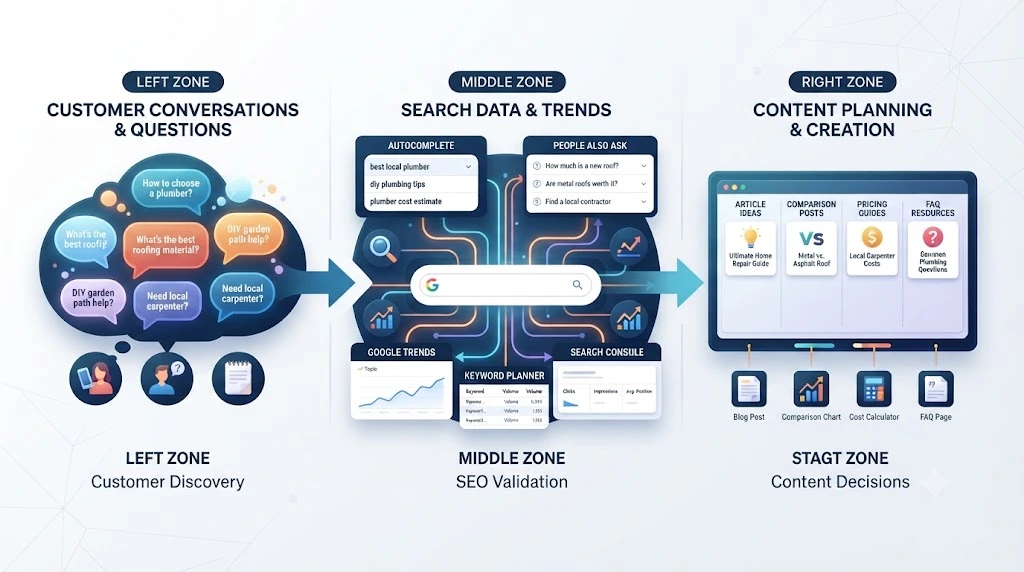
Open your sales call notes, demo recordings, emails and contact-form messages. Copy questions word for word. Don’t polish them. Rough wording is the useful part.
Support chats help too. Repeated “how do I…?” questions show where people get stuck. So do reviews, yours and your competitors’.
One caution: a customer sentence is evidence of a problem, not proof of search behaviour. You still need to check it in Google.
Want to see how this feedback fits into a wider plan? Read about using existing customer feedback to understand customer needs.
Turn Customer Questions Into Search Ideas
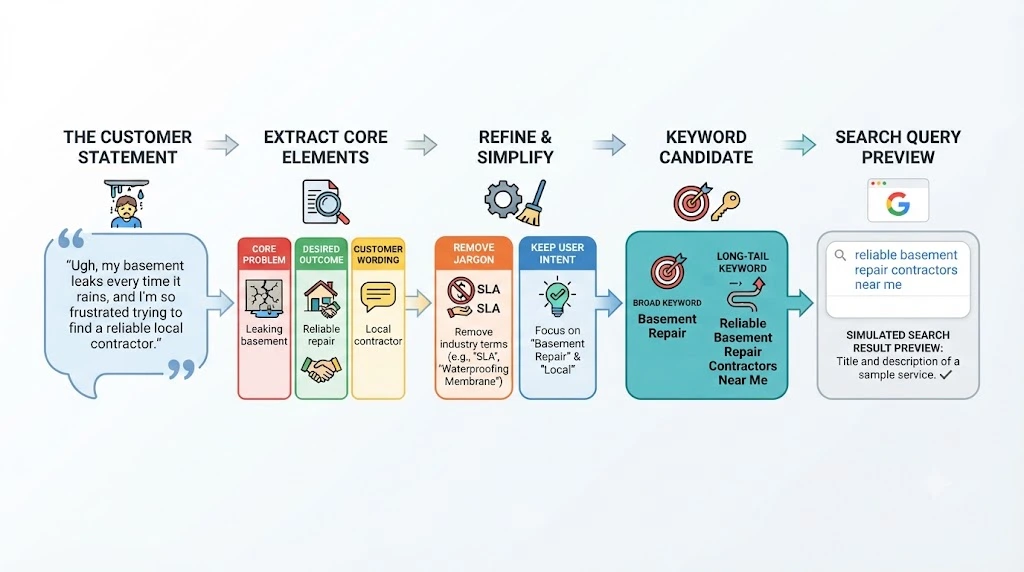
Take each customer statement through five steps.
- Find the problem. “I need cheaper bookkeeping” is a cost problem.
- Find the outcome. What do they want instead? Faster month-end, fewer errors, less admin?
- Keep their wording. “Match invoices and payments” says more than any internal label.
- Drop the jargon. You say “accounts receivable reconciliation”. They say “how to match invoices and payments”.
- Write candidates. Add modifiers like how, best, for, cost, without and alternative.
From “I spend hours every week reconciling invoices,” you might get “how to reconcile invoices faster” and “invoice reconciliation for small businesses”.
They’re still candidates. Google gets the next vote.
Use Google Search to Discover What People Are Searching For.
If you’ve ever asked, “What are people searching for on Google?” start on the results page. Google shows a lot if you know where to look.
Google Autocomplete
Type a candidate into the search box and stop before you press enter. The suggestions that drop down can reflect real searches. Google also shapes them by language, location, trending interest and personalisation, so treat them as clues, not search-volume numbers.
Try adding a modifier. “Invoice reconciliation” might become “invoice reconciliation in Excel” or “invoice reconciliation without software”. Each one hints at a different need.
People Also Ask
This box shows related questions. It’s great for finding subtopics and FAQ ideas. It won’t tell you how many people ask each one.
Related Searches
Scroll to the bottom of the results. These phrases show other ways people explore the topic.
Check the Page One SERP.
Read page one like a customer would. Are the results guides, product pages, tools, videos or forum threads?
That mix hints at what searchers want. If every result is a how-to guide and you plan a sales page, rethink the plan.
Use Google Trends to Find Current Search Interest.
So, what are people searching for right now? Google Trends is the quickest place to check.
Google Trends shows relative interest over time and by region. It does not give monthly search counts. Think of it as a direction finder, not a calculator.
Use it to see whether interest is rising or fading, spot seasonal peaks, and compare two phrases side by side.
Compare countries too. Search “invoice reconciliation” with the region set to the USA, India and the UK. If interest is stronger in one market, that can shape your examples and wording.
Don’t chase a topic just because it’s trending today. Pick topics your customers care about.
Use Google Keyword Planner to Validate Search Demand
Google Keyword Planner gives you estimated monthly searches, related ideas and country targeting. It’s the closest free thing to a demand number.
To access it, you need to complete the required Google Ads account setup and provide billing information. Google currently offers an option to create an account without launching a campaign, although the signup process may vary. Check Google’s current Keyword Planner instructions before you start.
You don’t need to buy a separate SEO subscription to use it. Just remember that its competition metric refers to advertisers, not organic SEO difficulty.
Very specific phrases may show no useful data. That doesn’t mean nobody searches for them. Treat it as one signal. Once you have a shortlist, our guide on how to find and evaluate long-tail keywords covers the next step.
Use Google Search Console to Find Existing Queries.
If your site already has some traffic, Search Console gives you first-party data. It shows the queries that already bring your pages into search results.
The performance report lists queries, clicks, impressions, click-through rate and average position. You can filter by page, country or query.
Look for surprises. A phrase you never targeted may already be sending impressions.
Search Console in Practice: The Wix Case Study
Google’s own Search Central team published a case study on Wix. Wix used the Search Console API to build reports inside its dashboard. Site owners could see clicks, impressions, traffic changes and main queries without leaving Wix.
According to the case study, more than 2 million Wix sites connected Search Console through the integration. Users who connected saw an average traffic increase of about 15% over a year, from July 2022 to July 2023, compared with their traffic before connecting.
That doesn’t prove the data alone caused the growth. Other changes may have played a part. Still, it shows how useful it is when site owners can see the queries behind their traffic. Read the full Wix case study on Google Search Central.
Validate Search Ideas Before Creating Content
Before you write, run each idea through five quick checks.
- Relevance: Would this searcher benefit from what you offer? If not, skip it.
- Intent: Does page one match the content you plan to create?
- Demand: Keyword Planner gives an estimate. Trends give direction.
- Who ranks: If page one is full of large, focused sites, find a narrower angle. For “invoice reconciliation”, that might mean small-business bookkeeping instead of enterprise software.
- Gaps: Read three or four top results. Maybe none show a worked example, or the advice is years old. That’s your opening.
Also check the results page for AI overviews, featured snippets and videos. They can change how many clicks regular results get. Not every phrase needs its own page. Some become a section or a FAQ answer.
A Practical Customer-to-Keyword Example
This is a fictional example, made up to show the process. It isn’t real client data.
A small bookkeeping firm hears this on a sales call: “I spend hours every week reconciling invoices, and I still miss things.”
Here’s how they work through it:
- Problem: reconciliation takes too long and feels error-prone.
- Candidates: “How to reconcile invoices faster” and “Invoice reconciliation for small business”.
- Google check: they note autocomplete suggestions and People Also Ask questions.
- Demand check: Keyword Planner and Trends for both phrases, then Search Console for related queries.
- SERP check: page one for the first phrase is mostly step-by-step guides.
- Decision: the first phrase becomes a how-to guide. The second becomes a section inside it. Two people also ask questions that become FAQs.
One customer sentence became a content plan. No paid platform needed.
A 15-Minute Search Discovery Workflow
Here’s a routine you can repeat every week.
- Pick one customer question or repeated problem.
- Write two or three search-phrase candidates.
- Type each into Google and note the autocomplete suggestions.
- Check People Also Ask and Related Searches.
- Read page one and note the main content type.
- Check Trends and Keyword Planner for your strongest candidates.
- Decide: article, section or FAQ.
Keep a simple sheet with five columns: customer wording, search phrase, where you found it, intent and decision.
Once you have several validated topics, group them. A topic cluster for small business SEO keeps related articles working together.
Common Mistakes
- Chasing volume alone. A big number means little if the searcher is the wrong person.
- Reading the Keyword Planner competition as SEO difficulty. It measures advertisers.
- Writing one article per phrase. Close variations often fit on one page.
- Ignoring customer wording. Tools show queries. Customers explain the reason behind them.
FAQs
How can I find what people are searching for on Google?
Use Autocomplete, People Also Ask and Related Searches to see query patterns. Then read page one to understand intent. Treat these as research signals and validate important phrases with other tools.
What are people searching for right now?
Check Google Trends. It shows how interest in a topic is moving over time and by region. It uses relative numbers, not exact search counts.
How do I find out what people are searching for without paid SEO tools?
Collect what people are searching for in their own words: questions from sales calls, support chats and reviews. Test them in Google Search, Google Trends and Keyword Planner.
Does Google Keyword Planner show SEO difficulty?
No. Its competition column refers to advertisers, not organic ranking difficulty.
What if Keyword Planner shows no search volume?
Don’t drop the topic right away. Check Trends and Search Console. If the phrase matches a real customer question, use it as a supporting section or FAQ.
Conclusion
Finding what people search for comes down to listening first and checking second. Start with the problems customers describe. Test their words in Google. Let the data decide which ideas earn a page.
Customer conversations give you language. Google gives you evidence. Your business decides which ideas are worth pursuing.
Ready to try it? Pick one customer question you heard this week and run the 15-minute workflow above. Then take your best phrase to the next step: choosing which long-tail keywords deserve a page.